
Solar snapshot setup guide
Install, brand and launch the snapshot in about an hour. Follow the steps in order.
Setup checklist
Load the snapshot
From the agency view, go to Sub-Accounts, open the account menu and choose Load Snapshot, or select this snapshot when creating the sub-account. Import all assets and switch into the account.
Fill in the business profile
Go to Settings > Business Profile and enter the business name, address, phone, website, license number if displayed, and time zone.
Set your custom values
Go to Settings > Custom Values and fill in business name, owner name, phone, service area and the booking, review, feedback and referral links. Review the lead offer, referral reward and seasonal offer and change them to what the installer actually provides.
Connect a phone number and register A2P
Go to Settings > Phone Numbers to buy or port a number, then complete A2P 10DLC registration in the Trust Center. Use accurate sample messages and opt-in language. Solar is a closely watched category with carriers.
Set up email sending
Go to Settings > Email Services and add a dedicated sending domain. Add the DNS records and verify it, since long-term nurture emails need good inbox placement.
Configure the Solar Savings Consultation calendar
Go to Calendars > Calendar Settings and open Solar Savings Consultation. Assign energy consultants or a round-robin, choose in-home or video location, set buffers for travel, then copy the booking link into the booking_link custom value.
Customize the quote form
Go to Sites > Forms > Builder and open Request a Quote / Booking Request. Confirm the bill range, Home Ownership and Utility Company questions, add a clear SMS and call consent checkbox, and embed it on the website or landing page.
Connect Google Business Profile and reviews
Go to Settings > Integrations and connect Google Business Profile. Then go to Reputation > Settings, copy the review link and paste it into the review_link custom value.
Import old leads and proposals
Go to Contacts > Import and upload past leads and unsigned proposals with consent status, utility company and bill range. Tag them so you can target workflows 14 and 21 later.
Assign staff and alerts
Go to Settings > My Staff and add energy consultants, the install coordinator and the owner with mobile numbers. Update the alert steps in workflows 01, 02, 03 and 13 under Automation > Workflows.
Publish the workflows
Go to Automation > Workflows, review each workflow's copy, and switch it from Draft to Publish. Keep 14, 20 and 21 in draft until you have a reason to launch them, such as a real rate increase announcement.
Go live test
Submit the form with your own number, book a consultation, call and hang up, and reply to a text. Confirm every SMS, email and alert fires, then delete the test contact.
Custom values: fill these once
All 21 workflows pull from these values, so your client's name, links and offers show up everywhere. Pre-filled solar defaults are shown; replace the business details.
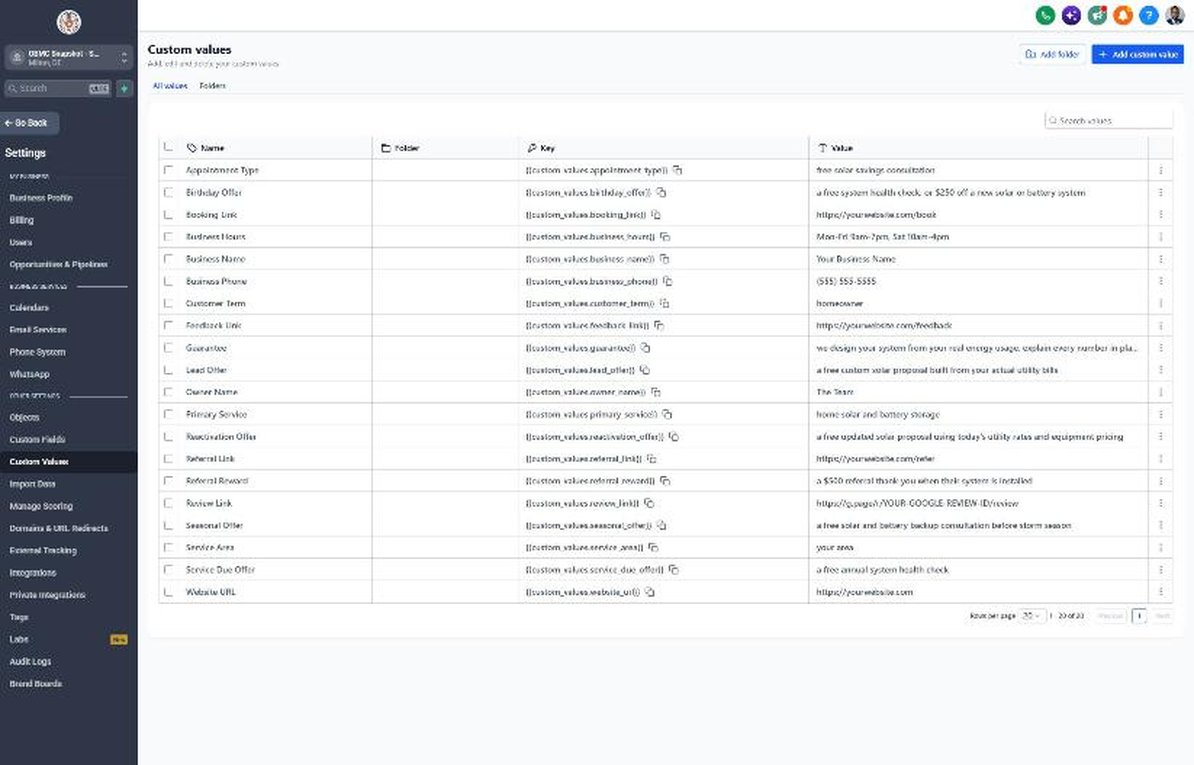
| Custom value | Solar default |
|---|---|
| Business Name | Your value |
| Business Phone | Your value |
| Owner Name | Your value |
| Website URL | Your value |
| Booking Link | Your value |
| Review Link | Your value |
| Feedback Link | Your value |
| Referral Link | Your value |
| Service Area | Your value |
| Customer Term | homeowner |
| Appointment Type | free solar savings consultation |
| Primary Service | home solar and battery storage |
| Lead Offer | a free custom solar proposal built from your actual utility bills |
| Guarantee | we design your system from your real energy usage, explain every number in plain English, and never pressure you to sign |
| Referral Reward | a $500 referral thank-you when their system is installed |
| Reactivation Offer | a free updated solar proposal using today's utility rates and equipment pricing |
| Seasonal Offer | a free solar and battery backup consultation before storm season |
| Service Due Offer | a free annual system health check |
| Birthday Offer | a free system health check, or $250 off a new solar or battery system |
| Business Hours | Mon-Fri 9am-7pm, Sat 10am-4pm |
KPIs to track every week
| Metric | Goal | Where in GoHighLevel |
|---|---|---|
| Speed to lead | First contact within 5 minutes of every new lead | Conversations and the contact activity timeline in Contacts |
| Lead to consultation rate | Steadily increase the share of leads that book a consultation | Opportunities > Pipelines > Sales Pipeline (New Lead vs Consultation Booked) |
| Consultation show rate | Aim for 80% or more of booked consultations completed | Calendars > Appointments (Showed vs No-Show) |
| Proposal to signed rate | Track monthly and improve it with follow-up and nurture | Opportunities > Pipelines (Proposal Sent vs Won) and Dashboard |
| Revived deals | Win deals every quarter from Long-Term Nurture and reactivation | Opportunities > Reactivation pipeline and Long-Term Nurture stage |
| Install timeline updates | Every signed customer hears from you at each Customer Journey stage | Opportunities > Pipelines > Customer Journey |
Campaign ideas for your client
- Free custom solar proposal built from 12 months of the homeowner's usage
- Free updated proposal when the utility announces a rate increase
- Battery backup consultation before storm or outage season
- Roof and solar bundle for homes with aging roofs
- Annual system health check for existing customers, including systems from other installers
Compliance notes
- Only text contacts with documented SMS consent from your company. Shared, aged and purchased solar leads are a common source of TCPA complaints, and carriers scrutinize solar traffic closely under A2P 10DLC.
- Never guarantee savings, bill elimination or a specific return. Describe savings as estimates based on stated assumptions, and follow FTC guidance and state solar consumer protection rules.
- Don't promise tax credits or incentives. Federal credit rules for homeowner-owned systems have changed, so tell homeowners to confirm eligibility with a tax professional and only mention programs you've verified.
- Avoid 'free solar' or 'no-cost' language for leases and PPAs. Clearly disclose that these are financing or third-party ownership agreements with long-term payments.
- Follow state disclosure and cancellation rules for home solicitation and solar contracts, including required right-to-cancel notices for in-home sales.
This is general guidance, not legal advice. Confirm the rules for your client's state and industry.