
Book more HVAC calls and sell more maintenance plans automatically
A ready-to-launch GoHighLevel system for heating and cooling companies: instant lead response, emergency call routing, estimate follow-up, reviews and a maintenance plan enrollment campaign.
Where hvac businesses lose money
A residential HVAC company with a handful of service techs and one or two comfort advisors who sell replacements. The office juggles emergency no-heat and no-cool calls, seasonal tune-ups and replacement estimates, and the owner wants more recurring maintenance plan revenue to smooth out the slow shoulder seasons.
- On the first hot or cold day of the season, calls come in faster than the office can answer, and missed calls go to the next company on Google.
- Replacement estimates go out and the comfort advisor never has time to follow up.
- Maintenance plan sign-ups depend on the tech remembering to mention them on every call.
- Shoulder seasons are slow and techs sit idle while past customers forget about tune-ups.
- Google reviews come in randomly instead of after every great service call.
What this snapshot fixes, automatically
Every new lead and missed call gets an instant text, with emergencies flagged for a call-back first.
Service visits book online with confirmations and reminders that reduce no-shows.
Replacement estimates get consistent follow-up about options, rebates and financing.
One-time customers get a steady invitation to join the maintenance plan.
Past customers get tune-up reminders that help fill the slow months.
Everything you need to launch hvac clients
- 21 pre-built workflows written for heating and cooling companies
- Maintenance Plan Enrollment campaign to grow recurring service agreements
- Missed-call text-back that asks about no-heat or no-cool emergencies
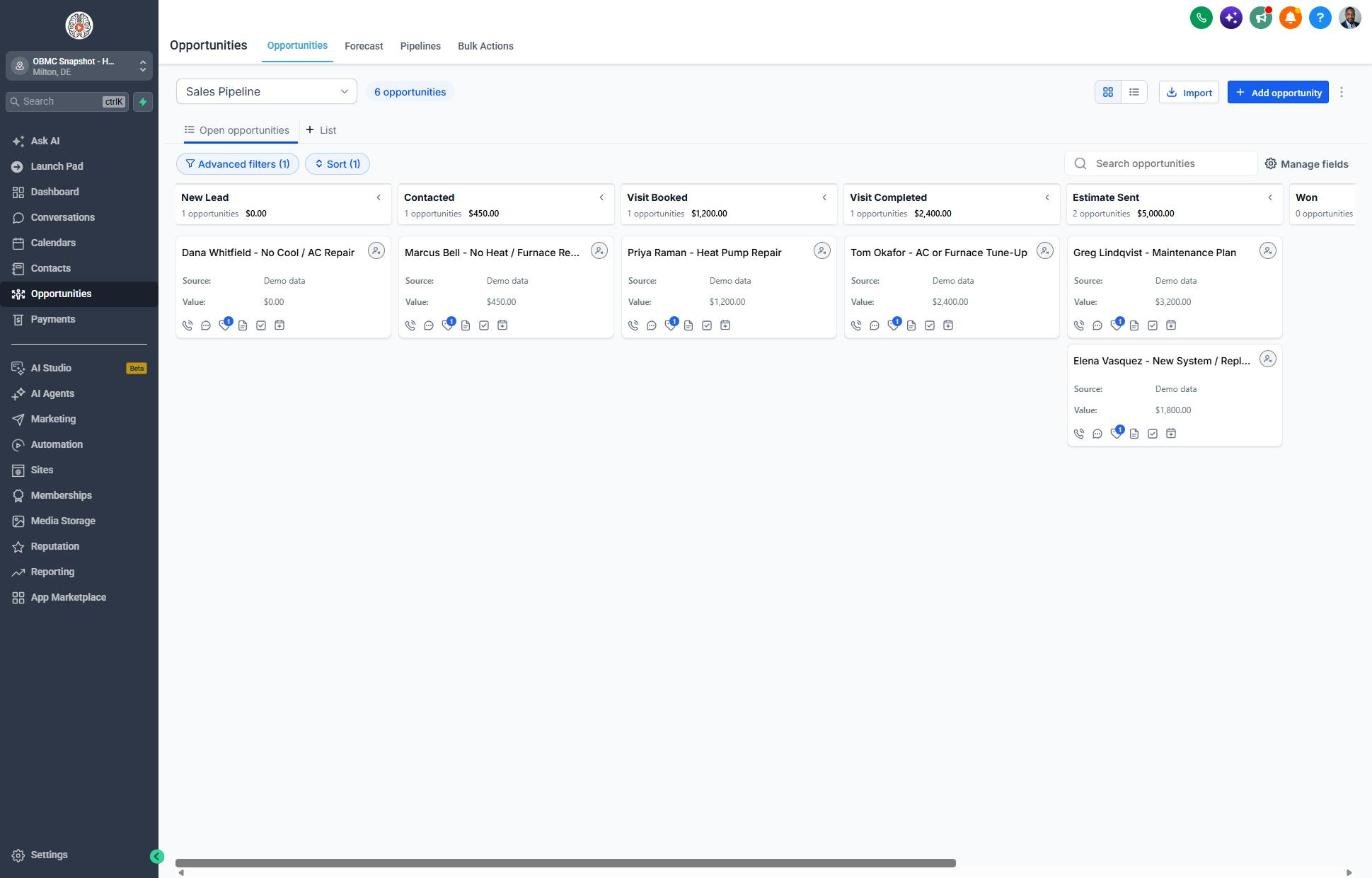
- Sales pipeline with Visit Booked, Visit Completed and Estimate Sent stages
- Customer Journey pipeline from Job Scheduled to Referral Partner
- HVAC Service Visit calendar with tech-on-the-way style reminders
- Service request form with Issue Urgency, System Type and System Age questions
- HVAC custom fields: system type, age, urgency, plan member status, last tune-up date, brand, ownership
- Spring AC and fall furnace tune-up reminder campaigns
- Replacement estimate follow-up covering options, rebates and financing
- Review request flow that sends happy customers to Google and unhappy ones to the owner
- Referral and database reactivation campaigns
- Step-by-step setup guide and 6-lesson course outline
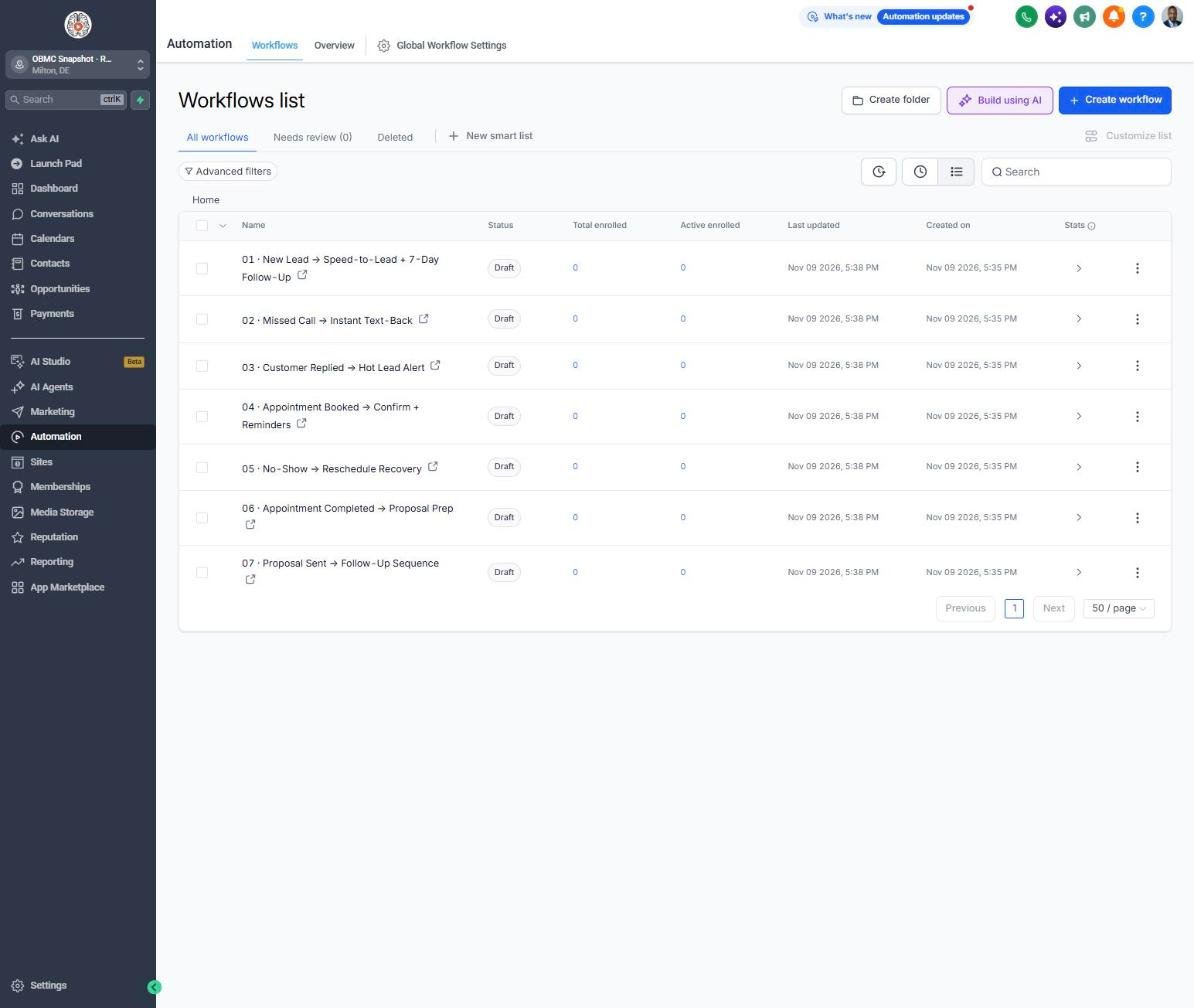
The complete hvac follow-up engine
Every workflow is built, written for the niche and wired to the pipelines. Your client fills in their business details once, and the copy updates everywhere.
New Lead → Speed-to-Lead + 7-Day Follow-Up
Texts and emails every new HVAC lead instantly, flags emergencies, and follows up for 7 days until a visit is booked.
Missed Call → Instant Text-Back
Texts back missed callers and asks them to reply URGENT if their home has no heat or AC.
Customer Replied → Hot Lead Alert
Alerts dispatch the moment a homeowner replies so someone can call while they're ready to book.
Appointment Booked → Confirm + Reminders
Confirms the service visit and sends reminders 24 hours and 2 hours before the tech arrives.
No-Show → Reschedule Recovery
Rebooks missed service visits before the next heat wave or cold snap fills the schedule.
Appointment Completed → Proposal Prep
Thanks the homeowner after the visit and reminds the comfort advisor to send repair or replacement options.
Proposal Sent → Follow-Up Sequence
Follows up on replacement estimates about options, efficiency, rebates and financing.
Deal Won → Welcome + Customer Journey
Welcomes new install customers and explains install day and the system walk-through.
Deal Lost → 30/60/90-Day Nurture
Keeps lost replacement estimates warm with 30, 60 and 90-day check-ins.
Job Completed → Feedback Request
Asks for feedback after every service call or install.
Feedback Submitted → Review Ask or Service Recovery
Sends happy homeowners to Google reviews and routes unhappy ones privately to the owner.
Happy Customer → Referral Request
Asks happy customers to refer friends whose systems are giving them trouble.
Referral Received → Thank You + Team Alert
Thanks the referrer and alerts the team to call the new lead the same day.
Database Reactivation Campaign
Re-engages past customers with a tune-up offer to fill the schedule.
Invoice Sent → Payment Reminders
Sends friendly reminders on overdue invoices.
Payment Received → Thank You
Thanks customers when payment comes in.
Birthday → Gift Offer
Sends a birthday discount good toward any repair or tune-up.
Stale Deal Alert (7 Days No Movement)
Alerts the owner when an estimate or deal sits for 7 days with no movement.
Service Due → Rebook Reminder
Reminds customers when their seasonal tune-up is due.
Seasonal Promo Campaign
Runs a pre-summer AC tune-up promotion, easily cloned for fall furnace season.
Maintenance Plan Enrollment
Invites one-time customers to join the maintenance plan for priority service and member pricing.
Know exactly where every deal stands
Sales Pipeline
Customer Journey
Reactivation
Training that makes it easy to sell and install
Setup guide
A 12-step install checklist with exact GoHighLevel menu paths.
Open guide → 🧭Walkthrough
Every workflow, trigger, message and pipeline stage explained.
See walkthrough → 🎓Mini-course
6 short visual lessons, from install to launch.
Start lesson 1 → 💼Agency sales kit (PDF)
Pitch script, cold outreach, pricing and KPIs to sell this niche.
Download →Built for agencies serving hvac
- Agencies running Google Ads, LSA or SEO for HVAC companies
- Residential heating and cooling contractors with service and replacement divisions
- HVAC owners who want more maintenance plan members and recurring revenue
- Shops that lose calls and estimates during peak season
Position it as the system that turns your ad leads into booked calls and recurring maintenance plan members, which is the number most HVAC owners care about. Launch the Maintenance Plan Enrollment and tune-up campaigns every shoulder season so you deliver visible results in the months when ads alone are weakest.
Suggested resale: setup $500-$1,500 + $297-$697/mo
Questions agencies ask
Do I need a GHL account?
Yes. This snapshot installs into a GoHighLevel sub-account, so you need an active GHL agency account or a sub-account from your agency.
What's not included?
Ad spend, your phone number and messaging fees, A2P registration, a website, a dispatch or field service platform, and done-for-you setup. Billing for maintenance plans is handled in GHL payments or your existing system, which you set up separately.
Phone number/A2P?
You need a GHL (LC Phone) or Twilio number, and US texting requires A2P 10DLC registration in the Trust Center. Approval can take from a few days to a couple of weeks, so start it on day one.
Does it replace ServiceTitan, Housecall Pro or my dispatch software?
No. It handles marketing, follow-up and reviews. Many shops connect their field service software to GHL with Zapier or webhooks so completed jobs trigger the feedback and maintenance plan workflows.
Can I sell maintenance plans through it?
The Maintenance Plan Enrollment campaign generates and follows up interest. You can collect recurring payments with GHL Payments or your existing billing tool and tag members so they get tune-up reminders.
How do emergency calls get handled?
The missed-call and new-lead texts ask homeowners to reply URGENT if they have no heat or no cooling, and team alerts make sure someone calls them back first. You still need a person or answering service to take emergency calls.
Can I edit the messages?
Yes. Every SMS and email is editable in Automation > Workflows, and offers and business details live in custom values so you can update them in one place.
Launch your next hvac client this week
One-time $397. Includes the snapshot, both PDFs, the walkthrough and the mini-course. Or get all 20 niches for $1,997.