
Turn every storm and roofing lead into a booked inspection
A done-for-you GoHighLevel system for roofers: instant lead response, inspection booking, estimate follow-up, reviews and a storm-response campaign you can launch the morning after hail.
Where roofing businesses lose money
A residential roofing company with 1-5 crews doing replacements, repairs and insurance restoration work. The owner or a sales rep runs inspections, writes estimates and walks homeowners through the insurance claim process, and nobody has time to chase every lead after a storm.
- Storm leads pile up faster than the office can call them back, and the roofer who calls first usually gets the inspection.
- Estimates go out and then nothing happens, because nobody owns the follow-up while the owner is on roofs.
- Missed calls during installs turn into homeowners calling the next roofer on Google.
- Insurance jobs stall for weeks waiting on adjusters, and homeowners go quiet in the meantime.
- Happy customers rarely leave Google reviews unless someone asks at the right moment.
What this snapshot fixes, automatically
Every new lead gets a text and email within seconds, day or night.
Inspections book themselves on a calendar with automatic reminders that cut no-shows.
Every estimate gets a consistent follow-up sequence, so fewer jobs go cold.
After a storm, you can reach your whole database in your service area in minutes.
Finished jobs automatically turn into review requests and referral asks.
Everything you need to launch roofing clients
- 21 pre-built workflows written in roofing language
- Storm Damage Response campaign for the days after hail or high wind
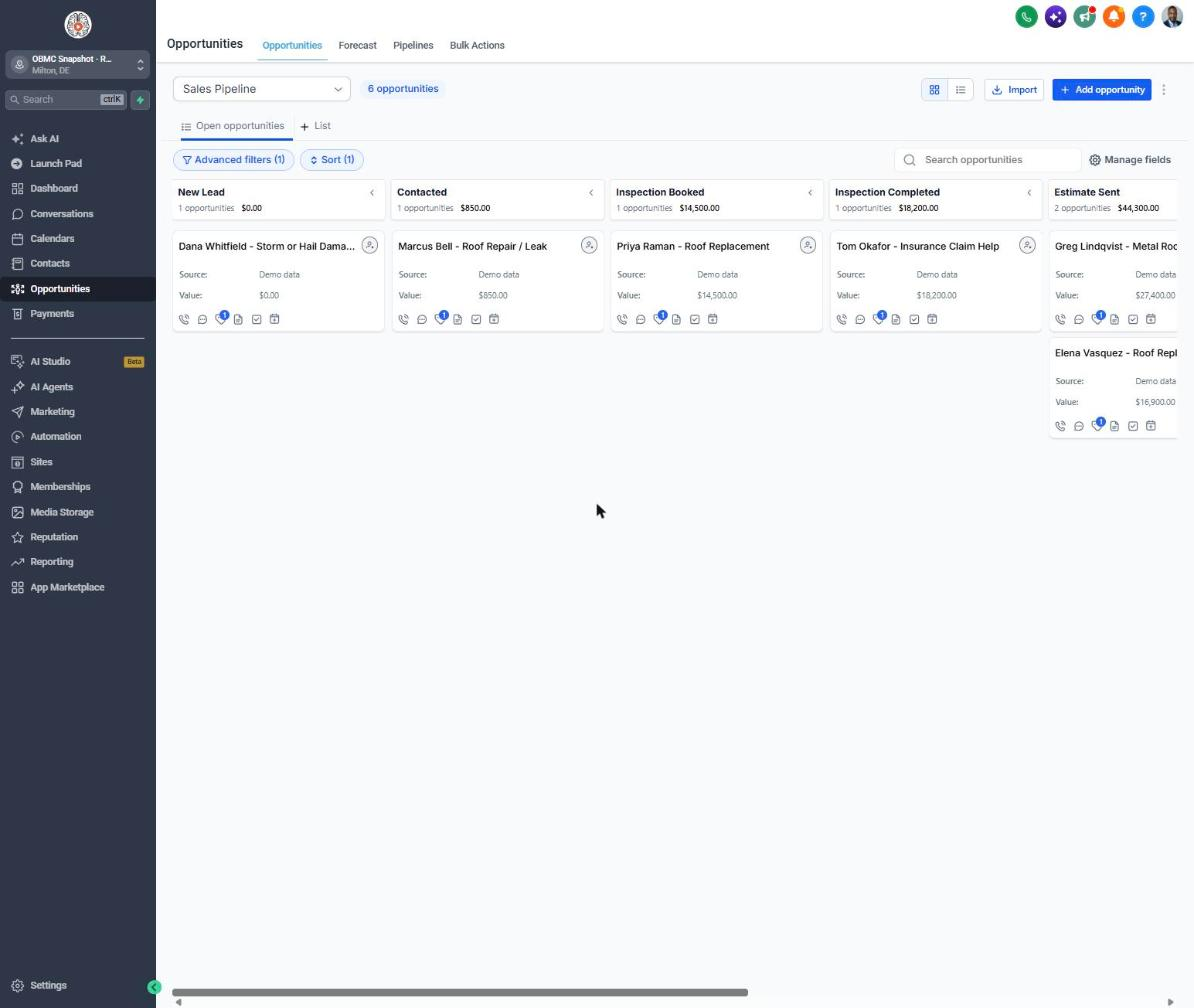
- Sales pipeline with Inspection Booked, Inspection Completed and Estimate Sent stages
- Customer Journey pipeline from Install Scheduled to Referral Partner
- Reactivation pipeline for old inspections and lost estimates
- Free Roof Inspection calendar with confirmation and reminder texts
- Quote request form with Damage Type, Roof Age and Insurance Claim Status questions
- Customer feedback form that routes 4-5 star ratings to Google and 1-3 stars to the owner
- Refer-a-Neighbor form with referral reward tracking
- Roofing custom fields: roof age, material, damage type, claim status, carrier, storm date, stories
- 20 custom values so every message is branded in minutes
- Annual roof checkup and pre-winter inspection campaigns
- Step-by-step setup guide and 6-lesson visual mini-course outline
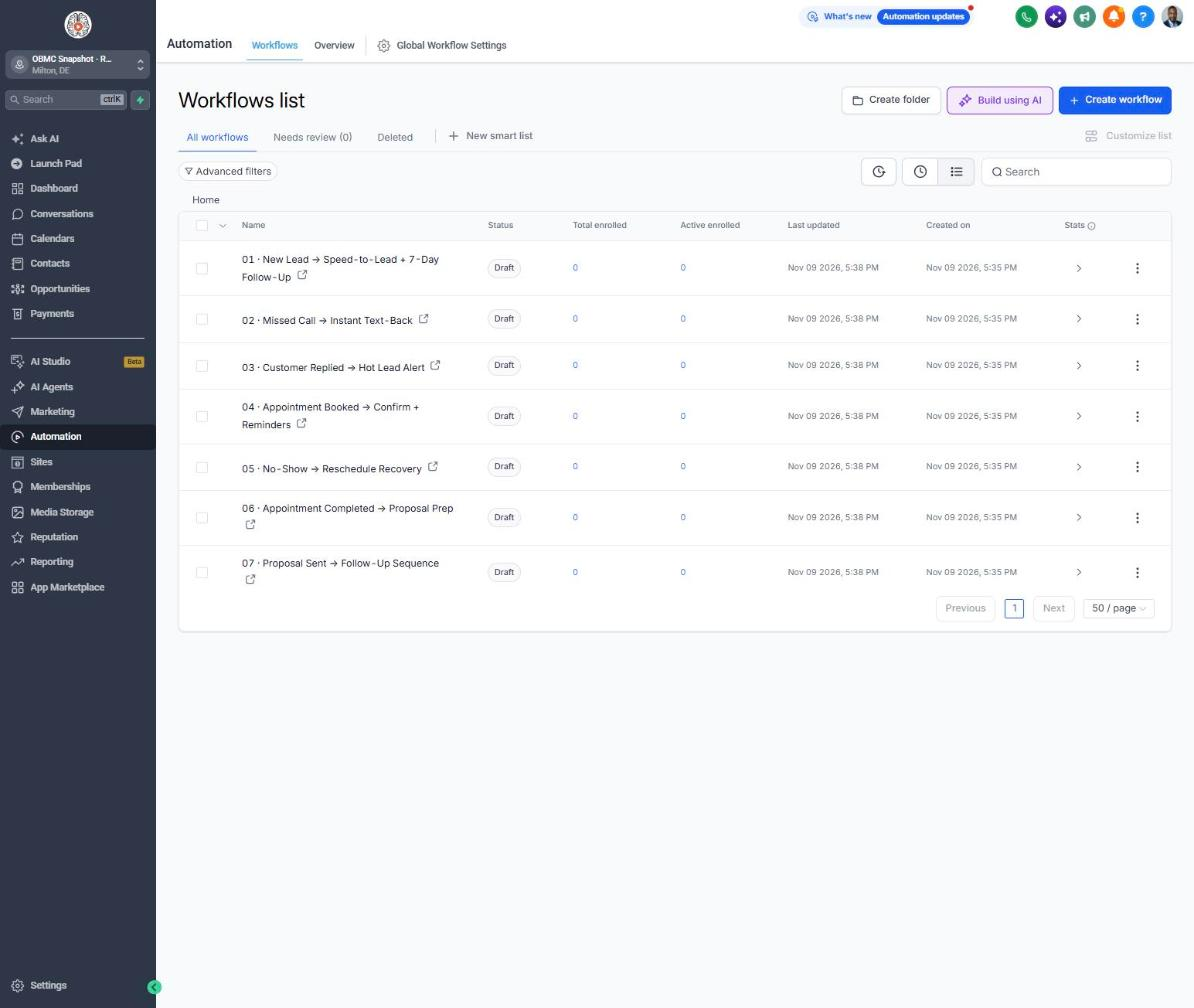
The complete roofing follow-up engine
Every workflow is built, written for the niche and wired to the pipelines. Your client fills in their business details once, and the copy updates everywhere.
New Lead → Speed-to-Lead + 7-Day Follow-Up
Texts and emails new roofing leads instantly, alerts the team, and follows up for 7 days until an inspection is booked.
Missed Call → Instant Text-Back
Texts back anyone whose call you miss while the crew is on a roof, asking about leaks or storm damage.
Customer Replied → Hot Lead Alert
Alerts the team the moment a homeowner replies so a rep can call while the lead is hot.
Appointment Booked → Confirm + Reminders
Confirms the free roof inspection and sends reminders 24 hours and 2 hours before.
No-Show → Reschedule Recovery
Recovers missed inspections with reschedule texts and an email offering to inspect while the homeowner is at work.
Appointment Completed → Proposal Prep
Thanks the homeowner after the inspection and reminds the rep to send photos and the estimate within 24 hours.
Proposal Sent → Follow-Up Sequence
Follows up on open estimates about materials, insurance scope and scheduling, then flags stalled deals.
Deal Won → Welcome + Customer Journey
Welcomes new customers and explains material delivery, install day and cleanup.
Deal Lost → 30/60/90-Day Nurture
Keeps lost estimates warm with 30, 60 and 90-day check-ins for when budgets or claims change.
Job Completed → Feedback Request
Asks for feedback after the final walk-through.
Feedback Submitted → Review Ask or Service Recovery
Sends happy homeowners to your Google review link and routes unhappy ones privately to the owner.
Happy Customer → Referral Request
Asks happy customers to refer neighbors, which matters most after a storm hits a whole street.
Referral Received → Thank You + Team Alert
Thanks the referrer and alerts the team to call the referred homeowner the same day.
Database Reactivation Campaign
Re-engages old inspections and past customers with a limited-time offer.
Invoice Sent → Payment Reminders
Sends friendly reminders on overdue invoices, including final insurance-check payments.
Payment Received → Thank You
Thanks customers when payment comes in.
Birthday → Gift Offer
Sends a birthday offer good toward any repair or replacement.
Stale Deal Alert (7 Days No Movement)
Alerts the owner when a deal sits in a stage for 7 days with no movement.
Service Due → Rebook Reminder
Reminds past customers when their annual roof checkup is due.
Seasonal Promo Campaign
Runs a pre-winter roof and gutter inspection promotion.
Storm Damage Response
Reaches homeowners in a storm-hit area within hours with a free damage inspection offer.
Know exactly where every deal stands
Sales Pipeline
Customer Journey
Reactivation
Training that makes it easy to sell and install
Setup guide
A 12-step install checklist with exact GoHighLevel menu paths.
Open guide → 🧭Walkthrough
Every workflow, trigger, message and pipeline stage explained.
See walkthrough → 🎓Mini-course
6 short visual lessons, from install to launch.
Start lesson 1 → 💼Agency sales kit (PDF)
Pitch script, cold outreach, pricing and KPIs to sell this niche.
Download →Built for agencies serving roofing
- Agencies running paid lead gen for residential roofing companies
- Roofing contractors doing retail replacements and insurance restoration
- Roofers who get slammed after storms and lose leads to faster competitors
- Owners who want estimate follow-up and reviews handled without hiring another office person
Sell it as the 'speed-to-lead and storm-response system' on top of your ad management, so the roofer sees inspections booked, not just leads delivered. The Storm Damage Response campaign gives you a reason to call every client after every storm, which is the moment roofers value you most and the easiest time to justify a retainer.
Suggested resale: setup $500-$1,500 + $297-$797/mo
Questions agencies ask
Do I need a GHL account?
Yes. This is a snapshot that loads into a GoHighLevel sub-account. You need an active GHL agency account (or a sub-account from your agency) to install it.
What's not included?
Ad spend, ad creative, your phone number and messaging fees, A2P registration, a website, and done-for-you setup. You load the snapshot, fill in your custom values, connect your phone and email, and publish the workflows.
Phone number/A2P?
You'll need a GHL (LC Phone) or Twilio number, and US texting requires A2P 10DLC registration through the Trust Center before texts will deliver reliably. Plan for a few days to a couple of weeks for approval.
Does it handle insurance claims?
It tracks claim status, carrier and storm date in custom fields and adjusts the follow-up wording. It doesn't file or negotiate claims. Many states restrict contractors from acting as a public adjuster, so the copy is written to keep you on the right side of that line.
How fast can I launch the storm campaign?
Once setup is done, tag the affected contacts by zip code or neighborhood and add the trigger tag. The campaign starts sending right away, within your messaging hours.
Can I change the messages?
Yes. Every message is fully editable inside Automation > Workflows, and most of the branding comes from custom values so you can change it in one place.
Will it work with my CRM or estimating software?
GHL can connect to most tools through Zapier, webhooks or native integrations. The snapshot works on its own, and you can push data in or out as needed.
Launch your next roofing client this week
One-time $397. Includes the snapshot, both PDFs, the walkthrough and the mini-course. Or get all 20 niches for $1,997.