
Roofing snapshot setup guide
Install, brand and launch the snapshot in about an hour. Follow the steps in order.
Setup checklist
Load the snapshot
In your agency view, go to Sub-Accounts, open the account's menu and choose Load Snapshot, or select this snapshot when creating a new sub-account. Choose to import everything. Then switch into the sub-account.
Fill in the business profile
Go to Settings > Business Profile and enter the legal business name, address, phone, website and time zone. The time zone controls when texts send and when inspections show on the calendar.
Set your custom values
Go to Settings > Custom Values and fill in business name, owner name, phone, service area, booking link, review link, feedback link and referral link. Adjust the roofing offers (lead offer, reactivation, seasonal, referral reward) to what the roofer will actually honor.
Connect a phone number and register A2P
Go to Settings > Phone Numbers to buy or port a number, then complete A2P 10DLC brand and campaign registration in the Trust Center. Workflows can be built while you wait, but don't run the reactivation or storm campaigns until approval comes through.
Set up email sending
Go to Settings > Email Services and add a dedicated sending domain (for example mail.roofingcompany.com). Add the DNS records it gives you and verify. This keeps estimate follow-ups out of spam.
Configure the Free Roof Inspection calendar
Go to Calendars > Calendar Settings and open Free Roof Inspection. Assign the inspector or sales rep, set availability, inspection length and buffer time for drive time between homes, and copy the booking link into the booking_link custom value.
Customize the quote form
Go to Sites > Forms > Builder and open Request a Quote. Confirm the Damage Type, Roof Age and Insurance Claim Status questions, add the TCPA consent checkbox, and embed the form on the website or connect it to Facebook lead ads.
Connect Google Business Profile and reviews
Go to Settings > Integrations and connect Google Business Profile. Then go to Reputation > Settings, copy the Google review link, and paste it into the review_link custom value.
Rename pipeline stages if needed
Go to Opportunities > Pipelines and confirm the Sales Pipeline stages read Inspection Booked, Inspection Completed and Estimate Sent. Adjust the Customer Journey stage names if the roofer uses different install milestones.
Assign users and notifications
Go to Settings > My Staff and add the owner, office staff and sales reps with their mobile numbers. Then open the alert steps in workflows 01, 02, 03 and 13 under Automation > Workflows and point them at the right people.
Publish the workflows
Go to Automation > Workflows, open each workflow, review the copy, and switch it from Draft to Publish. Leave 14 (Reactivation), 20 (Seasonal) and 21 (Storm Damage Response) in draft until you're ready to launch them on purpose.
Go live test
Submit the quote form with your own phone and email, book an inspection, call the number and hang up, and reply to a text. Confirm every SMS, email and team alert fires, then delete the test contact from Contacts.
Custom values: fill these once
All 21 workflows pull from these values, so your client's name, links and offers show up everywhere. Pre-filled roofing defaults are shown; replace the business details.
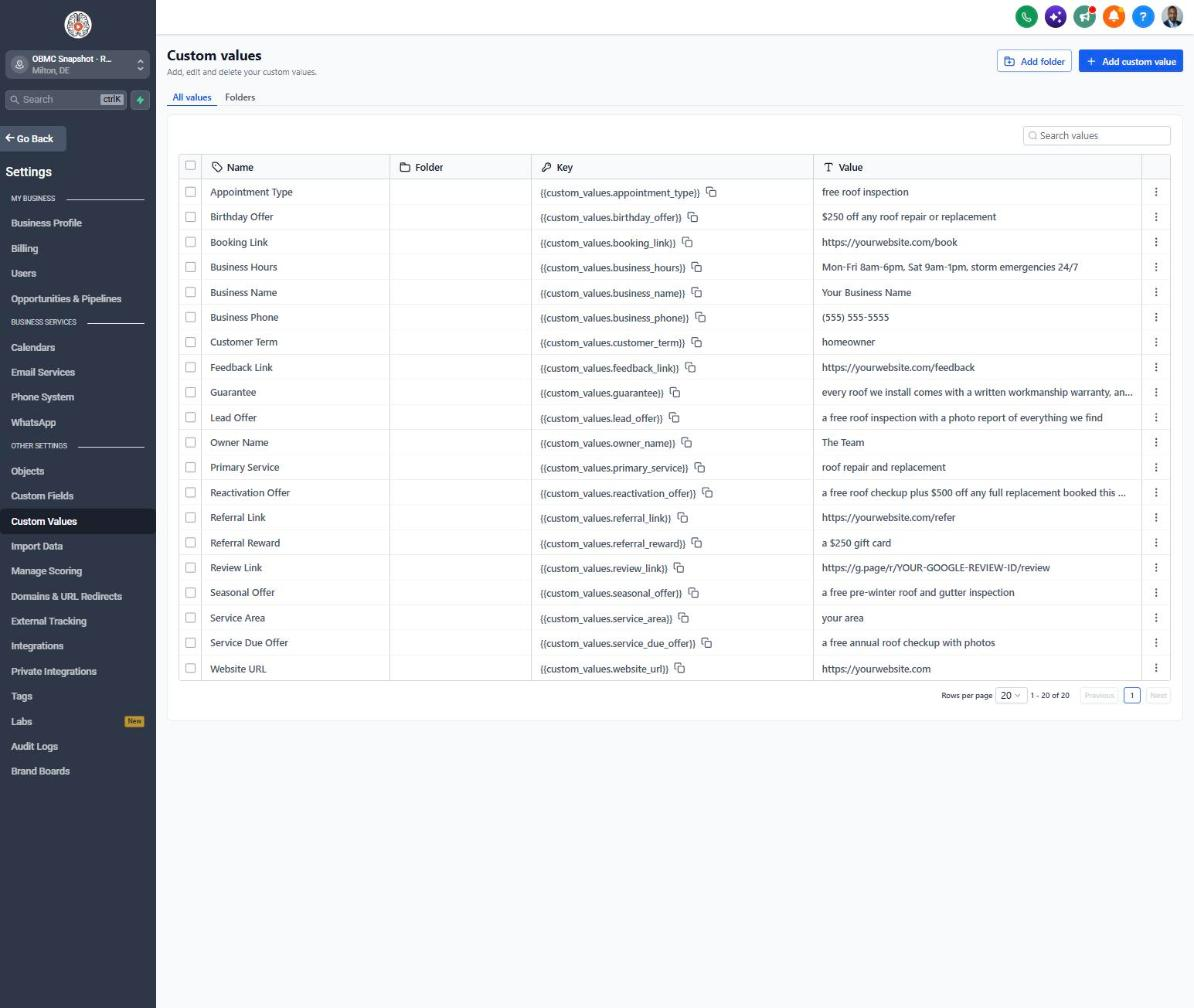
| Custom value | Roofing default |
|---|---|
| Business Name | Your value |
| Business Phone | Your value |
| Owner Name | Your value |
| Website URL | Your value |
| Booking Link | Your value |
| Review Link | Your value |
| Feedback Link | Your value |
| Referral Link | Your value |
| Service Area | Your value |
| Customer Term | homeowner |
| Appointment Type | free roof inspection |
| Primary Service | roof repair and replacement |
| Lead Offer | a free roof inspection with a photo report of everything we find |
| Guarantee | every roof we install comes with a written workmanship warranty, and we leave your property cleaner than we found it |
| Referral Reward | a $250 gift card |
| Reactivation Offer | a free roof checkup plus $500 off any full replacement booked this month |
| Seasonal Offer | a free pre-winter roof and gutter inspection |
| Service Due Offer | a free annual roof checkup with photos |
| Birthday Offer | $250 off any roof repair or replacement |
| Business Hours | Mon-Fri 8am-6pm, Sat 9am-1pm, storm emergencies 24/7 |
KPIs to track every week
| Metric | Goal | Where in GoHighLevel |
|---|---|---|
| Speed to lead | First contact within 5 minutes of every new lead | Contacts > contact record activity timeline, or Conversations |
| Lead to inspection rate | Steadily increase the share of leads that book an inspection month over month | Opportunities > Pipelines > Sales Pipeline (New Lead vs Inspection Booked counts) |
| Inspection show rate | Aim for 85% or more of booked inspections completed | Calendars > Appointments list (Showed vs No-Show) |
| Estimate close rate | Track every month and push to improve it with consistent follow-up | Opportunities > Pipelines (Estimate Sent vs Won) and Dashboard |
| New Google reviews | At least one new review for every few completed jobs | Reputation > Overview |
| Stale deals | Zero deals sitting more than 7 days without a next step | Opportunities > Pipelines filtered by last stage change, plus workflow 18 alerts |
Campaign ideas for your client
- Free roof inspection with a photo report the homeowner keeps
- Free post-storm damage inspection for a specific neighborhood or zip code
- Pre-winter roof and gutter tune-up at a flat price
- Financing options on full replacements, from the roofer's lending partner
- Annual roof maintenance plan for past customers
Compliance notes
- Get written consent before texting. Keep the TCPA consent checkbox on every form, and only add purchased or door-knock lists to SMS campaigns if those contacts gave consent.
- Complete A2P 10DLC registration before sending campaigns, and describe storm and reactivation messages accurately in the campaign use case.
- Many states prohibit contractors from negotiating insurance claims on a homeowner's behalf (that's a licensed public adjuster's job). Keep copy to inspecting, documenting and explaining, not 'we'll handle your claim.'
- Never advertise covering, waiving or rebating the homeowner's insurance deductible. It's illegal in several states, including Texas, and can be treated as insurance fraud.
- Check local rules on post-storm solicitation, door-to-door permits and contractor registration before launching a storm campaign in a new city.
This is general guidance, not legal advice. Confirm the rules for your client's state and industry.