
Fill Hygiene Chairs and Get Presented Treatment Scheduled
A HIPAA-aware GoHighLevel system for dental practices that answers new-patient calls, works the recall list, follows up on unscheduled treatment and runs year-end benefits campaigns.
Where dental businesses lose money
A general, family or cosmetic dental practice with one or more dentists and a hygiene department, seeing a mix of insured and self-pay patients. Production depends on keeping hygiene chairs full, getting presented treatment scheduled and attracting new patients, but the front desk rarely has time to work the recall and unscheduled treatment lists.
- New patient calls go to voicemail while the front desk is checking someone out
- The recall list grows every month and hygiene chairs still have open slots
- Treatment gets presented, the patient says 'let me think about it' and never schedules
- Year-end benefit reminders happen late or not at all
- Generic texting tools make it too easy to send sensitive patient information
What this snapshot fixes, automatically
Every missed call gets a text back, with a prompt for patients in pain to call
Patients due for hygiene get timely, automatic recall reminders
Unscheduled treatment gets a respectful follow-up that moves clinical questions to the phone
Insured patients get a clear year-end reminder that their benefits may reset
Happy patients are invited to leave a Google review after their visit
Everything you need to launch dental clients
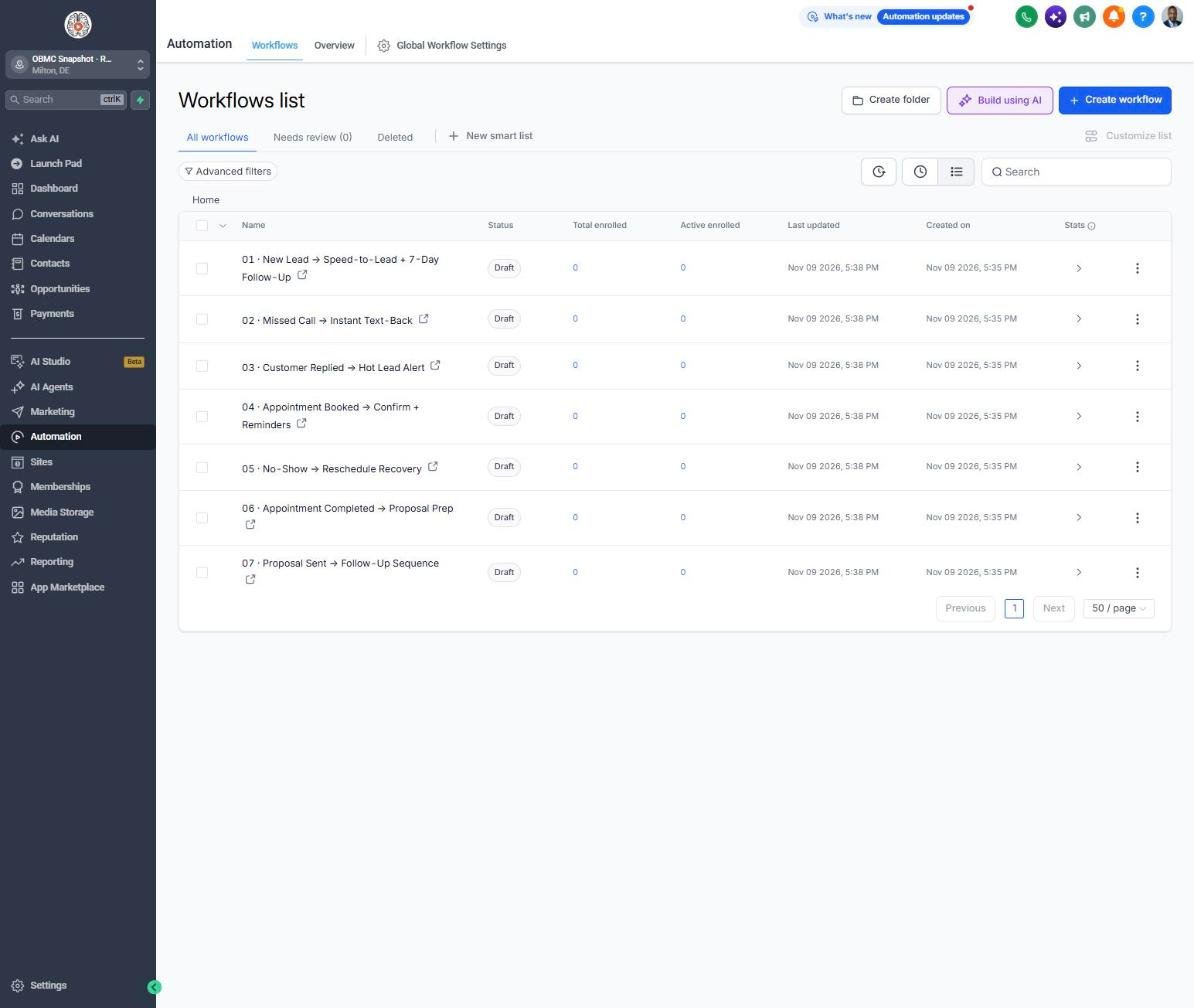
- 21 pre-built workflows written for general and family dental practices
- Year-end insurance benefits campaign for October through December
- Hygiene recall reminders by interval (3, 4, 6 or 12 months)
- Unscheduled treatment follow-up sequence covering insurance, phasing and payment options
- Missed-call text-back with an emergency prompt
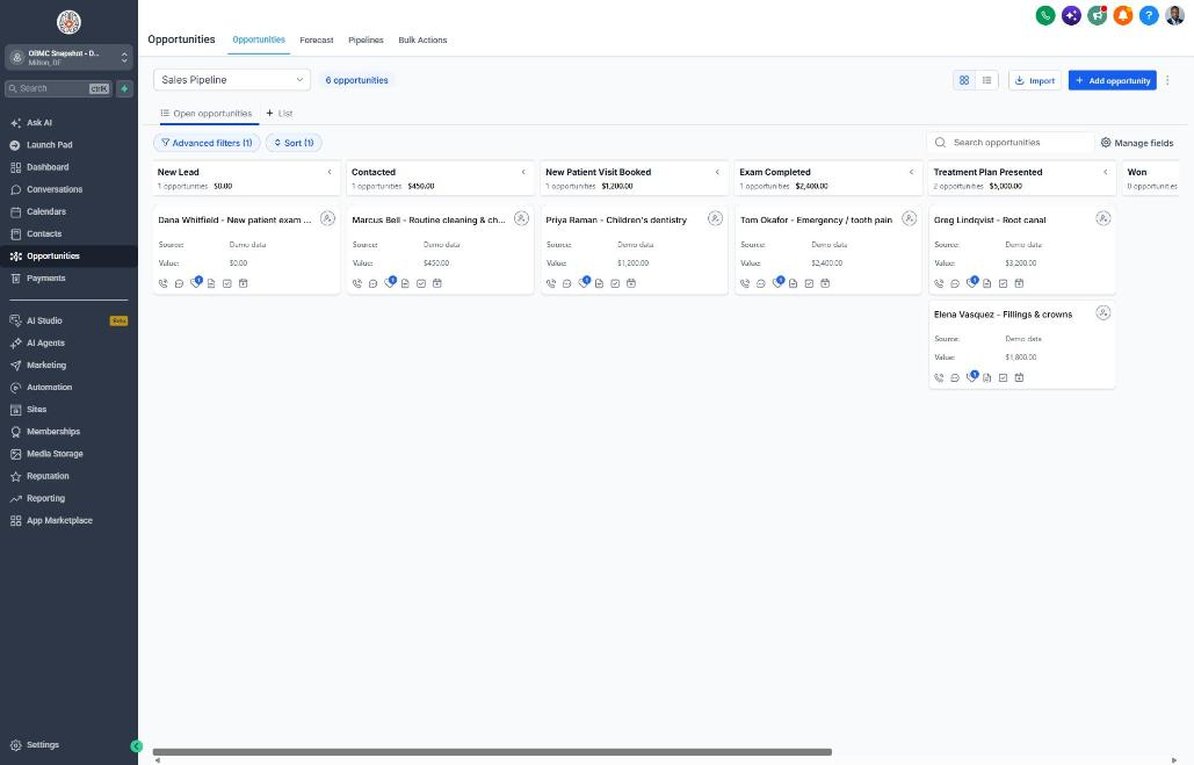
- Sales pipeline with New Patient Visit Booked, Exam Completed and Treatment Plan Presented stages
- Patient Journey from Treatment Scheduled to Treatment Completed and Referral Partner
- Back-to-school family checkup campaign
- "New Patient Visit" calendar with insurance and paperwork reminders
- 7 dental custom fields including insurance, recall interval and unscheduled treatment value
- Appointment request form that collects scheduling and insurance basics only
- Review request with private service recovery for unhappy patients
- Lapsed-patient reactivation campaign
- Setup guide with HIPAA-aware notes, 6-lesson course outline and agency sales kit
The complete dental follow-up engine
Every workflow is built, written for the niche and wired to the pipelines. Your client fills in their business details once, and the copy updates everywhere.
New Lead → Speed-to-Lead + 7-Day Follow-Up
Responds to new patient requests right away and follows up for a week until the first visit is booked.
Missed Call → Instant Text-Back
Texts back missed callers and asks anyone in pain to call back right away.
Customer Replied → Hot Lead Alert
Alerts the front desk as soon as a patient replies.
Appointment Booked → Confirm + Reminders
Confirms appointments and reminds patients to bring insurance cards and complete secure forms.
No-Show → Reschedule Recovery
Gently rebooks patients who missed their appointment so the chair time isn't lost for good.
Appointment Completed → Proposal Prep
Thanks the patient after their exam and reminds the team to send the treatment estimate.
Proposal Sent → Follow-Up Sequence
Follows up on unscheduled treatment with insurance, phasing and payment answers, keeping clinical questions to the phone.
Deal Won → Welcome + Customer Journey
Welcomes new patients and points them to secure forms and insurance check.
Deal Lost → 30/60/90-Day Nurture
Keeps in gentle touch with patients who didn't schedule their first visit.
Job Completed → Feedback Request
Asks patients about their visit experience, without collecting health details.
Feedback Submitted → Review Ask or Service Recovery
Invites happy patients to Google and alerts the office manager to any concern.
Happy Customer → Referral Request
Invites patients to refer friends and family, with a charitable thank-you instead of a cash reward.
Referral Received → Thank You + Team Alert
Thanks the referring patient and alerts the team to contact the new patient.
Database Reactivation Campaign
Invites patients who haven't been seen in 18+ months back for a cleaning and checkup.
Invoice Sent → Payment Reminders
Sends discreet reminders on patient balances.
Payment Received → Thank You
Thanks the patient and clears the past-due tag.
Birthday → Gift Offer
Sends a birthday message with a small gift at their next visit.
Stale Deal Alert (7 Days No Movement)
Alerts the treatment coordinator when a new patient or plan hasn't moved in a week.
Service Due → Rebook Reminder
Sends hygiene recall reminders when patients are due for their cleaning and checkup.
Seasonal Promo Campaign
Runs a back-to-school family checkup campaign to fill after-school times.
Use-It-or-Lose-It: Year-End Insurance Benefits
Reminds insured patients that benefits may reset January 1 and prompts them to schedule hygiene and unscheduled treatment.
Know exactly where every deal stands
Sales Pipeline
Customer Journey
Reactivation
Training that makes it easy to sell and install
Setup guide
A 12-step install checklist with exact GoHighLevel menu paths.
Open guide → 🧭Walkthrough
Every workflow, trigger, message and pipeline stage explained.
See walkthrough → 🎓Mini-course
6 short visual lessons, from install to launch.
Start lesson 1 → 💼Agency sales kit (PDF)
Pitch script, cold outreach, pricing and KPIs to sell this niche.
Download →Built for agencies serving dental
- Agencies that market general, family and cosmetic dental practices
- Practice owners with open hygiene slots and a growing recall list
- Office managers and treatment coordinators tracking unscheduled treatment
- Practices that want a year-end benefits campaign without building it from scratch
Lead with recall and unscheduled treatment follow-up, since they produce scheduled appointments from patients the practice already has. Retain the practice by running the year-end benefits campaign every fall and the back-to-school campaign every summer, and report on recall and treatment acceptance monthly.
Suggested resale: setup $1,000-$2,500 + $497-$1,497/mo
Questions agencies ask
Do I need a GHL account?
Yes. This is a GoHighLevel snapshot, so you need a GHL plan that supports snapshots and workflows. Dental practices should also check whether their plan offers HIPAA features and a Business Associate Agreement.
What's not included?
Your GHL subscription, phone and messaging fees, A2P registration fees, ad spend, practice management software integration and legal or compliance review. This is a marketing and communication tool, not a replacement for your practice management system.
Do I need a phone number and A2P registration?
Yes. Texting from GHL in the US requires a LeadConnector number and an approved A2P 10DLC registration. Describe the use case as appointment reminders, recall and patient communications.
Is this HIPAA compliant?
The copy is HIPAA-aware: it never asks for health details by text and doesn't name procedures in messages. Full compliance also depends on your GHL plan, signing a BAA where available, staff access controls and your own policies, so review it with your compliance advisor.
Does it connect to Dentrix, Eaglesoft or Open Dental?
Not directly. Most practices export recall, unscheduled treatment and lapsed-patient reports as CSV files and import them, or use a third-party sync tool. Keep imports to contact and scheduling data, not clinical notes.
Can I advertise a new patient special?
Yes, but check your state dental board's advertising rules and your insurance contracts. Specials are often limited to self-pay patients, which is how the default Lead Offer is worded.
Can I change the offers and messages?
Yes. Offers live in Settings > Custom Values and every message can be edited in Automation > Workflows. Have the dentist or office manager approve any changes to clinical or insurance wording.
Launch your next dental client this week
One-time $397. Includes the snapshot, both PDFs, the walkthrough and the mini-course. Or get all 20 niches for $1,997.