
HVAC snapshot setup guide
Install, brand and launch the snapshot in about an hour. Follow the steps in order.
Setup checklist
Load the snapshot
From the agency view, go to Sub-Accounts, open the account menu and choose Load Snapshot, or pick this snapshot while creating a new sub-account. Import all assets, then switch into the sub-account.
Fill in the business profile
Go to Settings > Business Profile and enter the business name, address, phone, website and time zone. The time zone controls quiet hours for texts and the calendar display.
Set your custom values
Go to Settings > Custom Values and fill in business name, owner name, phone, service area and your booking, review, feedback and referral links. Set the tune-up, reactivation and maintenance plan offers to what the shop actually sells.
Connect a phone number and register A2P
Go to Settings > Phone Numbers to buy or port a number, and turn on missed-call text-back routing. Complete A2P 10DLC registration in the Trust Center before sending any campaign.
Set up email sending
Go to Settings > Email Services and add a dedicated sending domain. Add the DNS records and verify so tune-up reminders and estimates land in the inbox.
Configure the HVAC Service Visit calendar
Go to Calendars > Calendar Settings and open HVAC Service Visit. Assign techs or a round-robin, set arrival windows and service hours, then copy the booking link into the booking_link custom value.
Customize the service request form
Go to Sites > Forms > Builder and open Request a Quote / Booking Request. Confirm Issue Urgency, System Type and System Age, add the SMS consent checkbox, and embed it on the website.
Connect Google Business Profile and reviews
Go to Settings > Integrations and connect Google Business Profile. Then go to Reputation > Settings, copy the review link and paste it into the review_link custom value.
Tag existing maintenance plan members
Import your customer list under Contacts > Import and map the Maintenance Plan Member and Last Tune-Up Date fields. This keeps current members out of the enrollment campaign and feeds the tune-up reminders.
Assign staff and alerts
Go to Settings > My Staff and add dispatchers, comfort advisors and the owner with mobile numbers. Then update the alert steps in workflows 01, 02, 03 and 13 under Automation > Workflows.
Publish the workflows
Go to Automation > Workflows, review each workflow's copy and switch it from Draft to Publish. Keep 14, 20 and 21 in draft until you decide when to launch each campaign.
Go live test
Submit the form with your own number, book a visit, call and hang up, and reply URGENT to the text-back. Confirm every SMS, email and team alert fires, then delete the test contact.
Custom values: fill these once
All 21 workflows pull from these values, so your client's name, links and offers show up everywhere. Pre-filled hvac defaults are shown; replace the business details.
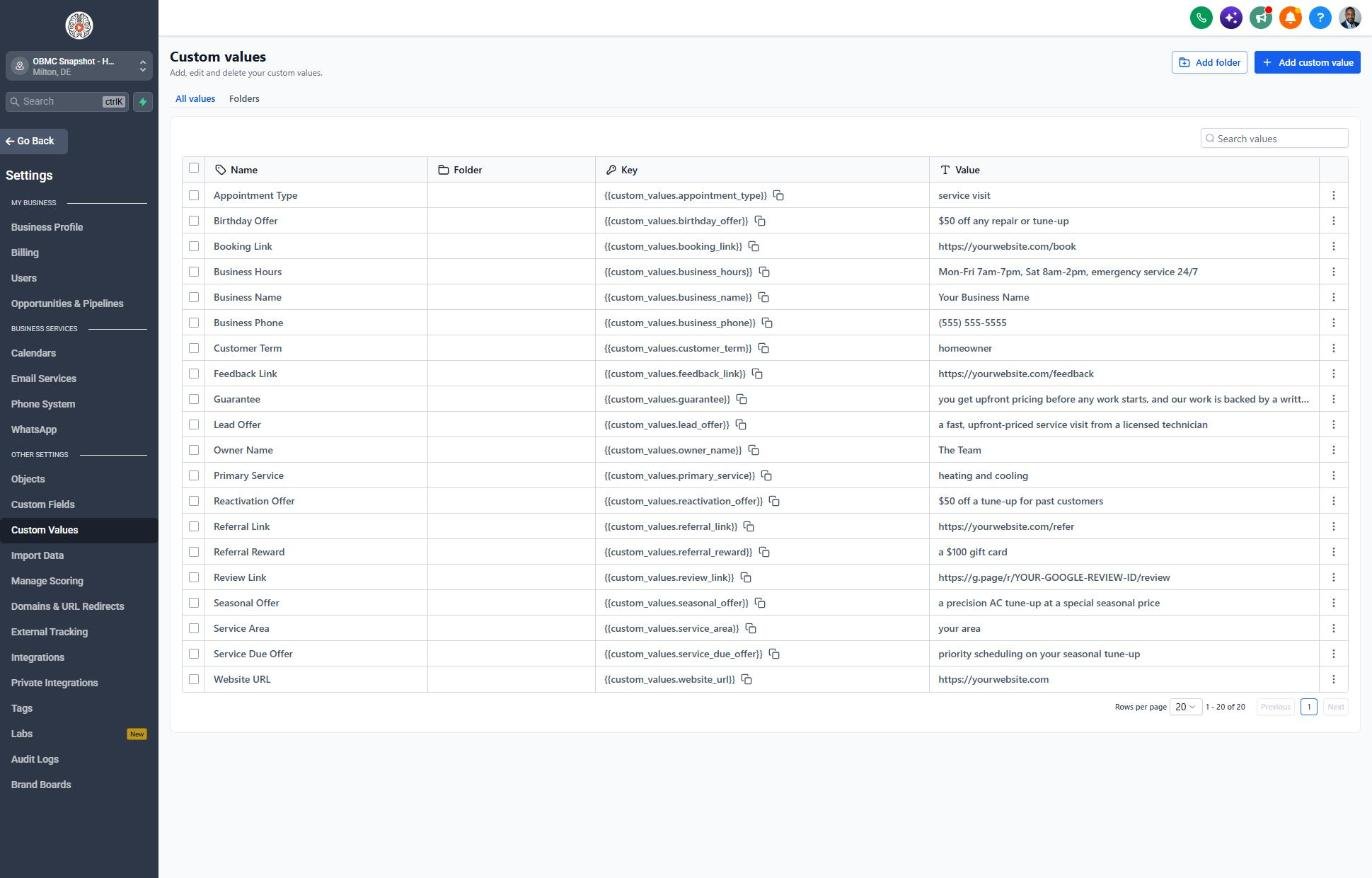
| Custom value | HVAC default |
|---|---|
| Business Name | Your value |
| Business Phone | Your value |
| Owner Name | Your value |
| Website URL | Your value |
| Booking Link | Your value |
| Review Link | Your value |
| Feedback Link | Your value |
| Referral Link | Your value |
| Service Area | Your value |
| Customer Term | homeowner |
| Appointment Type | service visit |
| Primary Service | heating and cooling |
| Lead Offer | a fast, upfront-priced service visit from a licensed technician |
| Guarantee | you get upfront pricing before any work starts, and our work is backed by a written workmanship warranty |
| Referral Reward | a $100 gift card |
| Reactivation Offer | $50 off a tune-up for past customers |
| Seasonal Offer | a precision AC tune-up at a special seasonal price |
| Service Due Offer | priority scheduling on your seasonal tune-up |
| Birthday Offer | $50 off any repair or tune-up |
| Business Hours | Mon-Fri 7am-7pm, Sat 8am-2pm, emergency service 24/7 |
KPIs to track every week
| Metric | Goal | Where in GoHighLevel |
|---|---|---|
| Speed to lead | First contact within 5 minutes, and emergencies called back right away | Conversations and the contact activity timeline in Contacts |
| Booked call rate | Steadily increase the share of leads and calls that become booked visits | Opportunities > Pipelines > Sales Pipeline (New Lead vs Visit Booked) |
| Visit show rate | 90% or more of booked visits completed | Calendars > Appointments (Showed vs No-Show) |
| Replacement estimate close rate | Track monthly and improve it with consistent follow-up | Opportunities > Pipelines (Estimate Sent vs Won) and Dashboard |
| Maintenance plan enrollments | Grow the member count every month | Contacts filtered by Maintenance Plan Member = Yes, plus workflow 21 stats in Automation > Workflows |
| New Google reviews | Ask after every completed call and grow reviews every week | Reputation > Overview |
Campaign ideas for your client
- Spring AC tune-up special before the first heat wave
- Fall furnace or heat pump safety check
- Maintenance plan with two tune-ups a year, priority service and member repair pricing
- Free second opinion on any replacement quote
- Replacement financing options through the shop's lending partner
Compliance notes
- Collect clear SMS consent on every form and in the booking flow. Don't add purchased lists or contacts without consent to text campaigns.
- Register A2P 10DLC and describe tune-up reminders and maintenance plan offers accurately in your campaign use case.
- Don't promise specific energy savings or bill reductions. Phrase efficiency as 'can help' and point to the equipment's rated efficiency instead.
- Rebates and tax incentives change often. Only mention rebates you've confirmed are currently available in the service area, and tell homeowners eligibility depends on the program.
- Spell out maintenance plan terms (what's included, renewal, cancellation) in writing, and follow your state's automatic renewal rules if you bill members on a recurring basis.
This is general guidance, not legal advice. Confirm the rules for your client's state and industry.