
Turn solar leads into signed contracts, even months later
A GoHighLevel system built for the long solar sales cycle: instant lead response, consultation booking, proposal follow-up, long-term nurture and a utility rate increase campaign.
Where solar businesses lose money
A residential solar installer or dealer with a few energy consultants who run in-home or virtual consultations, build proposals from utility bills, and hand signed deals to a site survey, permitting and install team. Their biggest leaks are slow first contact, no-show consultations and proposals that go quiet for months.
- Leads cost real money, and the ones that aren't contacted within minutes often book with another installer.
- Consultations no-show, and reps lose hours driving to homes where nobody answers the door.
- Proposals go out and then sit for weeks with no follow-up while the homeowner talks to three other companies.
- Most homeowners aren't ready on day one, and there's no system to stay in touch until they are.
- Signed customers get anxious during permitting and utility approval because nobody updates them.
What this snapshot fixes, automatically
Every new lead gets a text and email within seconds, with a clear next step.
Consultations get confirmations and reminders that ask homeowners to have their bill ready.
Every proposal gets a consistent, low-pressure follow-up sequence.
Leads that aren't ready stay in a long-term nurture instead of getting lost.
Rate increase announcements become a reason to restart conversations with your whole database.
Everything you need to launch solar clients
- 21 pre-built workflows written for residential solar
- Utility Rate Increase Alert campaign for old leads, proposals and lost deals
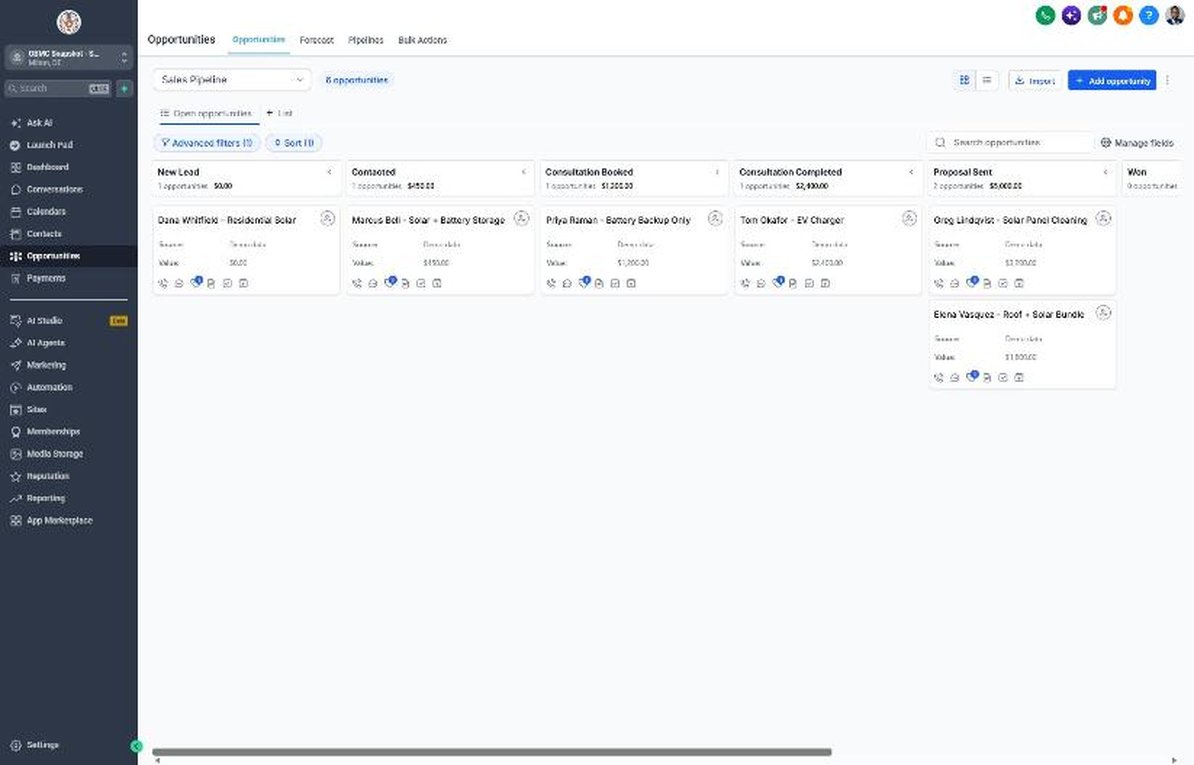
- Sales pipeline with Consultation Booked, Consultation Completed and Proposal Sent stages
- Customer Journey pipeline from Site Survey Scheduled to System Activated
- Solar Savings Consultation calendar with bill-ready reminders
- Quote form with Average Monthly Electric Bill, Home Ownership and Utility Company questions
- Solar custom fields: bill range, utility, ownership, roof condition, shade, financing preference, timeline, site survey date
- Proposal follow-up that explains cash, loan, lease and PPA options
- Welcome sequence that walks new customers through survey, permits, install and utility approval
- Annual system health check reminders
- Battery backup seasonal campaign
- Review, referral and reactivation flows
- Setup guide, compliance notes and 6-lesson course outline
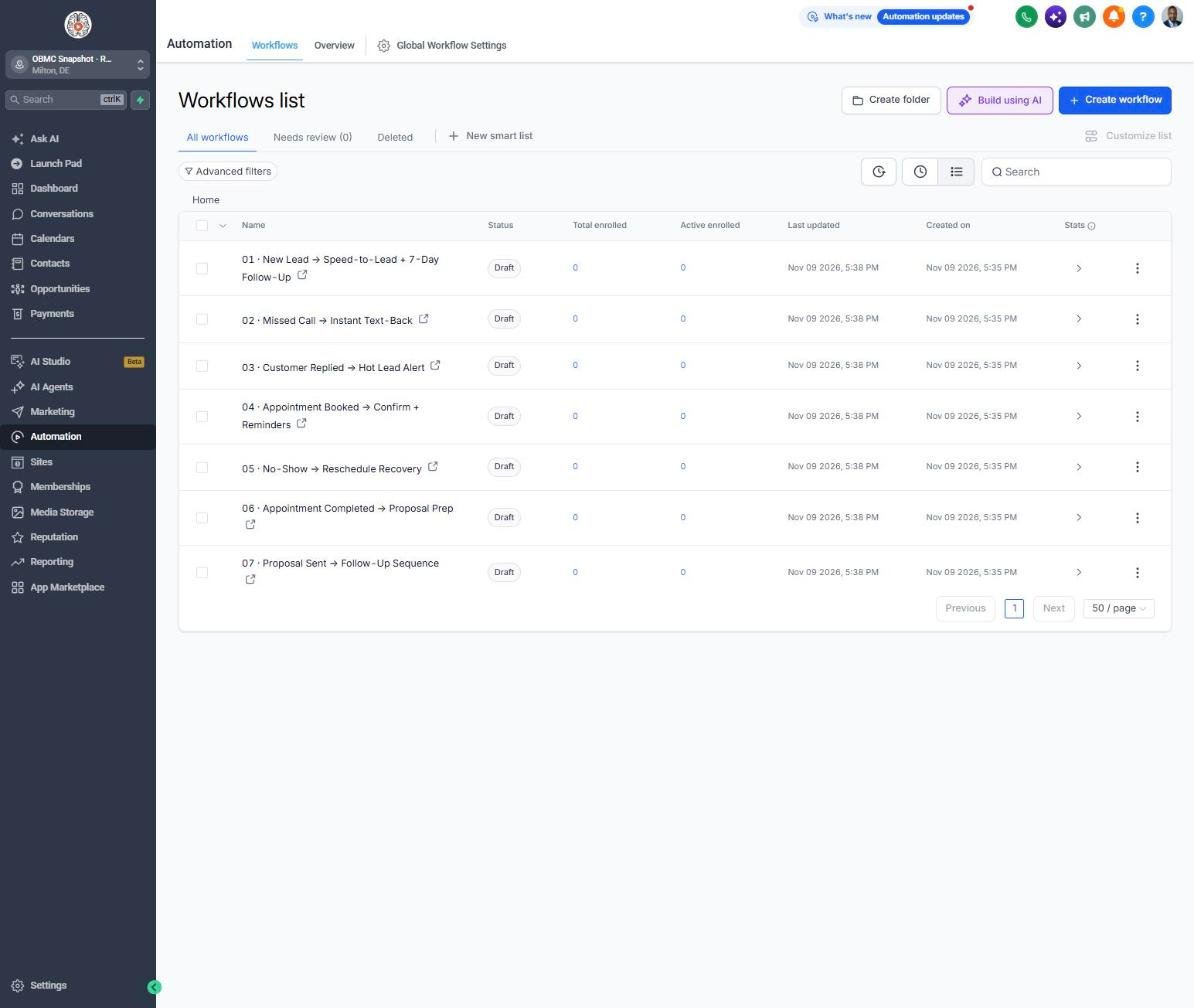
The complete solar follow-up engine
Every workflow is built, written for the niche and wired to the pipelines. Your client fills in their business details once, and the copy updates everywhere.
New Lead → Speed-to-Lead + 7-Day Follow-Up
Texts and emails every new solar lead instantly, asks for a utility bill, and follows up for 7 days.
Missed Call → Instant Text-Back
Texts back missed callers and asks whether they're asking about a new system or an existing one.
Customer Replied → Hot Lead Alert
Alerts the energy consultant the moment a homeowner replies so they can call while interest is high.
Appointment Booked → Confirm + Reminders
Confirms the consultation, asks the homeowner to have a bill ready, and sends reminders 24 hours and 2 hours before.
No-Show → Reschedule Recovery
Recovers no-shows by offering a video or phone consultation with the proposal built ahead of time.
Appointment Completed → Proposal Prep
Thanks the homeowner after the consultation and reminds the rep to send the proposal within 24 hours.
Proposal Sent → Follow-Up Sequence
Follows up on proposals about the numbers, financing options, roof questions and next steps.
Deal Won → Welcome + Customer Journey
Welcomes new customers and explains the site survey, permitting, install and utility approval timeline.
Deal Lost → 30/60/90-Day Nurture
Keeps lost and stalled deals warm with 30, 60 and 90-day check-ins for a long sales cycle.
Job Completed → Feedback Request
Asks for feedback after the system is activated.
Feedback Submitted → Review Ask or Service Recovery
Sends happy customers to Google reviews and routes unhappy ones privately to the owner.
Happy Customer → Referral Request
Asks happy customers to refer neighbors who are curious about their panels.
Referral Received → Thank You + Team Alert
Thanks the referrer and alerts the team to contact the referred homeowner the same day.
Database Reactivation Campaign
Re-engages old leads with a free updated proposal using current rates and pricing.
Invoice Sent → Payment Reminders
Sends friendly reminders on overdue invoices or deposits.
Payment Received → Thank You
Thanks customers when payment comes in.
Birthday → Gift Offer
Sends a birthday offer for a system check or a discount on a new system.
Stale Deal Alert (7 Days No Movement)
Alerts the owner when a deal sits in a stage for 7 days with no movement.
Service Due → Rebook Reminder
Reminds customers when their annual system health check is due.
Seasonal Promo Campaign
Runs a battery backup consultation campaign before storm or outage season.
Utility Rate Increase Alert
Restarts conversations with your whole database when the utility announces a rate increase.
Know exactly where every deal stands
Sales Pipeline
Customer Journey
Reactivation
Training that makes it easy to sell and install
Setup guide
A 12-step install checklist with exact GoHighLevel menu paths.
Open guide → 🧭Walkthrough
Every workflow, trigger, message and pipeline stage explained.
See walkthrough → 🎓Mini-course
6 short visual lessons, from install to launch.
Start lesson 1 → 💼Agency sales kit (PDF)
Pitch script, cold outreach, pricing and KPIs to sell this niche.
Download →Built for agencies serving solar
- Agencies generating residential solar leads through paid ads or lead vendors
- Solar installers and dealers with in-house or virtual energy consultants
- Solar companies with a big database of old leads and unsigned proposals
- Owners who want a long-term nurture system for a long sales cycle
Solar clients judge agencies on cost per signed deal, and most of the leads you generate won't sign for weeks or months. This snapshot works that pipeline for them, and the Utility Rate Increase Alert gives you a timely reason to reactivate their whole database, so you can show signed deals coming from leads they had written off.
Suggested resale: setup $750-$2,000 + $397-$997/mo
Questions agencies ask
Do I need a GHL account?
Yes. This snapshot installs into a GoHighLevel sub-account, so you need an active GHL agency account or a sub-account from your agency.
What's not included?
Ad spend, lead purchases, your phone number and messaging fees, A2P registration, proposal or design software, financing partners and done-for-you setup.
Phone number/A2P?
You need a GHL (LC Phone) or Twilio number, and US texting requires A2P 10DLC registration in the Trust Center. Solar campaigns get extra scrutiny from carriers, so describe your use case accurately and only text contacts who gave consent.
Does it work with purchased or shared leads?
Only text leads where you have documented consent to contact them by SMS from your company. Many shared and aged lead sources don't meet that bar, so check with your vendor before importing them into SMS campaigns.
Does it connect to my proposal or design software?
GHL can connect to most tools through Zapier, webhooks or native integrations. Many installers send the proposal link from their design tool and move the deal to Proposal Sent to start the follow-up.
Does the copy mention tax credits?
No. Incentive rules change, and federal credit rules for homeowner-owned systems have changed recently. The copy tells homeowners to confirm eligibility with a tax professional, and you can add confirmed local incentives yourself.
Can I edit the messages?
Yes. Every message is editable in Automation > Workflows, and offers and business details come from custom values so you can change them in one place.
Launch your next solar client this week
One-time $397. Includes the snapshot, both PDFs, the walkthrough and the mini-course. Or get all 20 niches for $1,997.