
Real Estate snapshot walkthrough
A guided tour of every pipeline, form and automation, with the actual messages your client’s customers will receive.
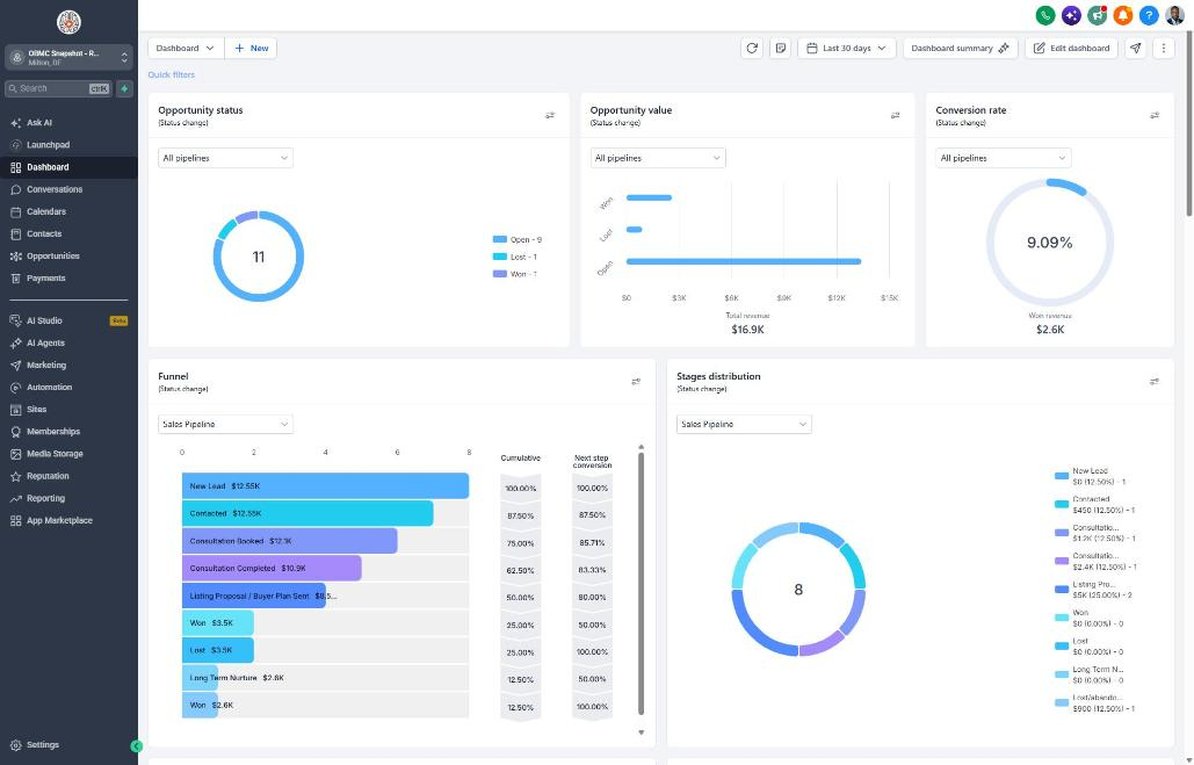
How a lead flows through the system
- Capture: the quote form, a missed call or an imported list starts a workflow.
- Respond in seconds: SMS and email go out instantly and the team gets an alert.
- Book: the Buyer & Seller Consultation calendar confirms and reminds automatically.
- Close: estimates and proposals get a 13-day follow-up so nothing slips.
- Deliver and delight: the Customer Journey pipeline handles feedback, reviews and referrals.
- Reactivate: past customers come back through service-due, seasonal and niche campaigns.
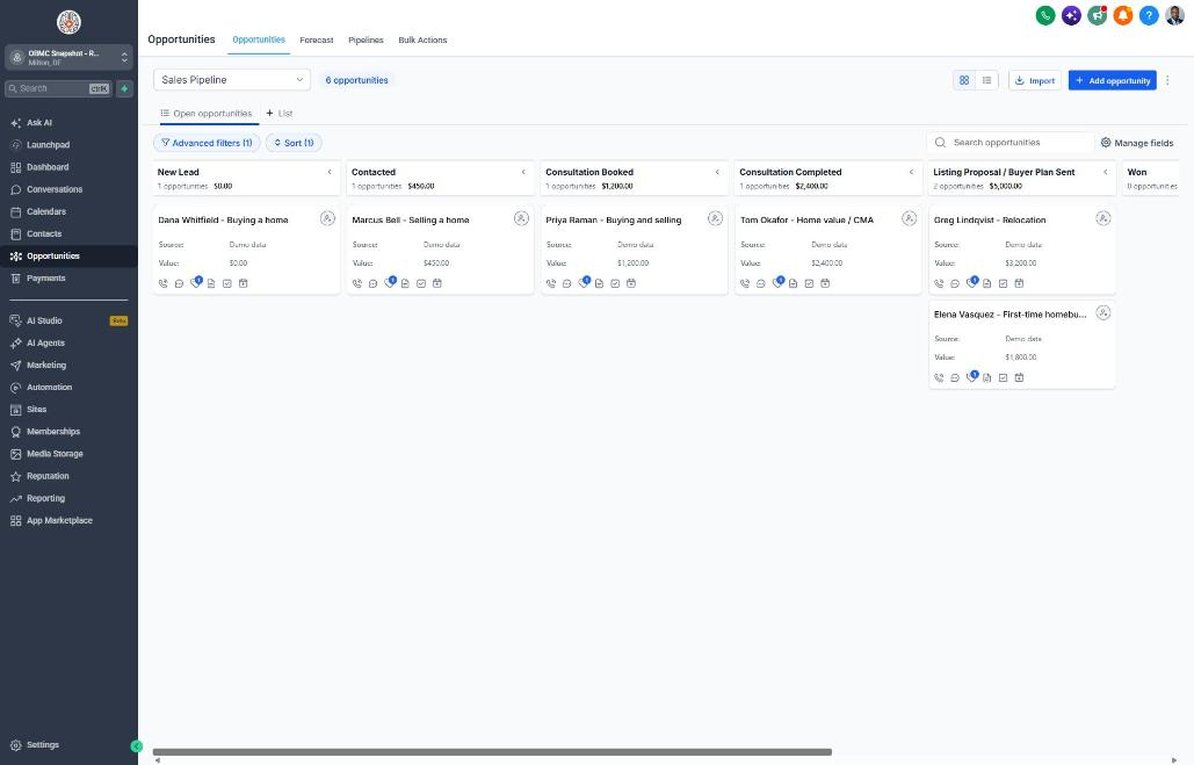
Three pipelines, named for real estate
Sales Pipeline
Every new inquiry from first touch to signed job.
Customer Journey
Delivery, feedback, reviews and referrals after the sale.
Reactivation
Turns your old list into booked work with the reactivation campaign.
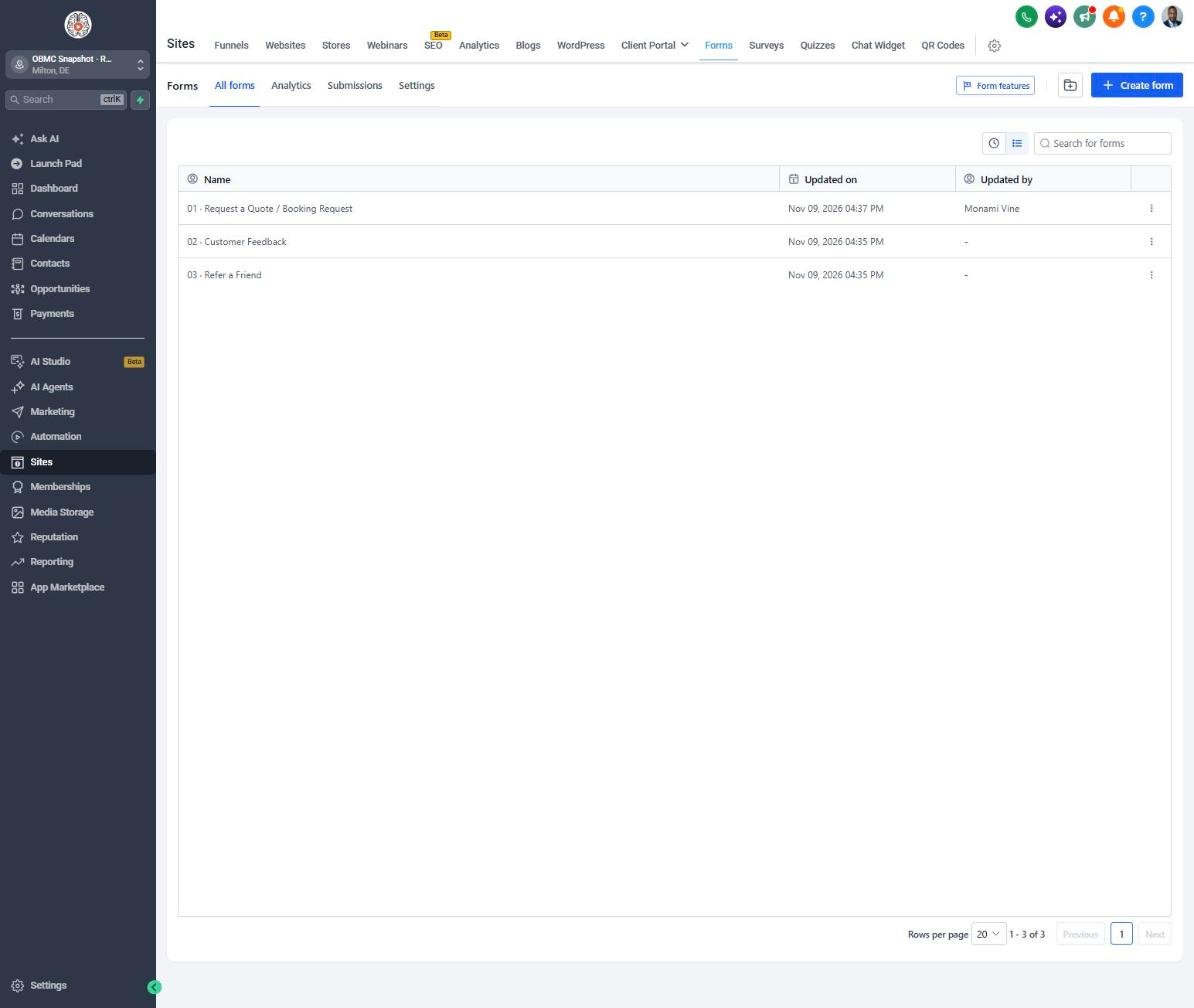
Capture the right details the first time
01 · Request a Quote / Booking Request
Main lead form for the website, funnels, ads and QR codes. Starts workflow 01.
02 · Customer Feedback
Private 1-5 rating. Happy customers get the review link; unhappy ones trigger service recovery.
03 · Refer a Friend
Captures referrals and alerts the team to call the new lead the same day.
Real Estate fields included
- Lead Type (Buyer, Seller, Buyer and seller, Investor, Renter)
- Price Range (Under $250k, $250k-$400k, $400k-$600k, $600k-$900k, $900k-$1.5M)
- Pre-Approval Status (Pre-approved, Not yet, Paying cash, Not sure)
- Property Address
- Areas of Interest
- Working With an Agent (No, Yes, Not sure)
- Closing Date
Plus 13 core fields: timeline, budget, preferred contact method, feedback rating, referral details and service dates.
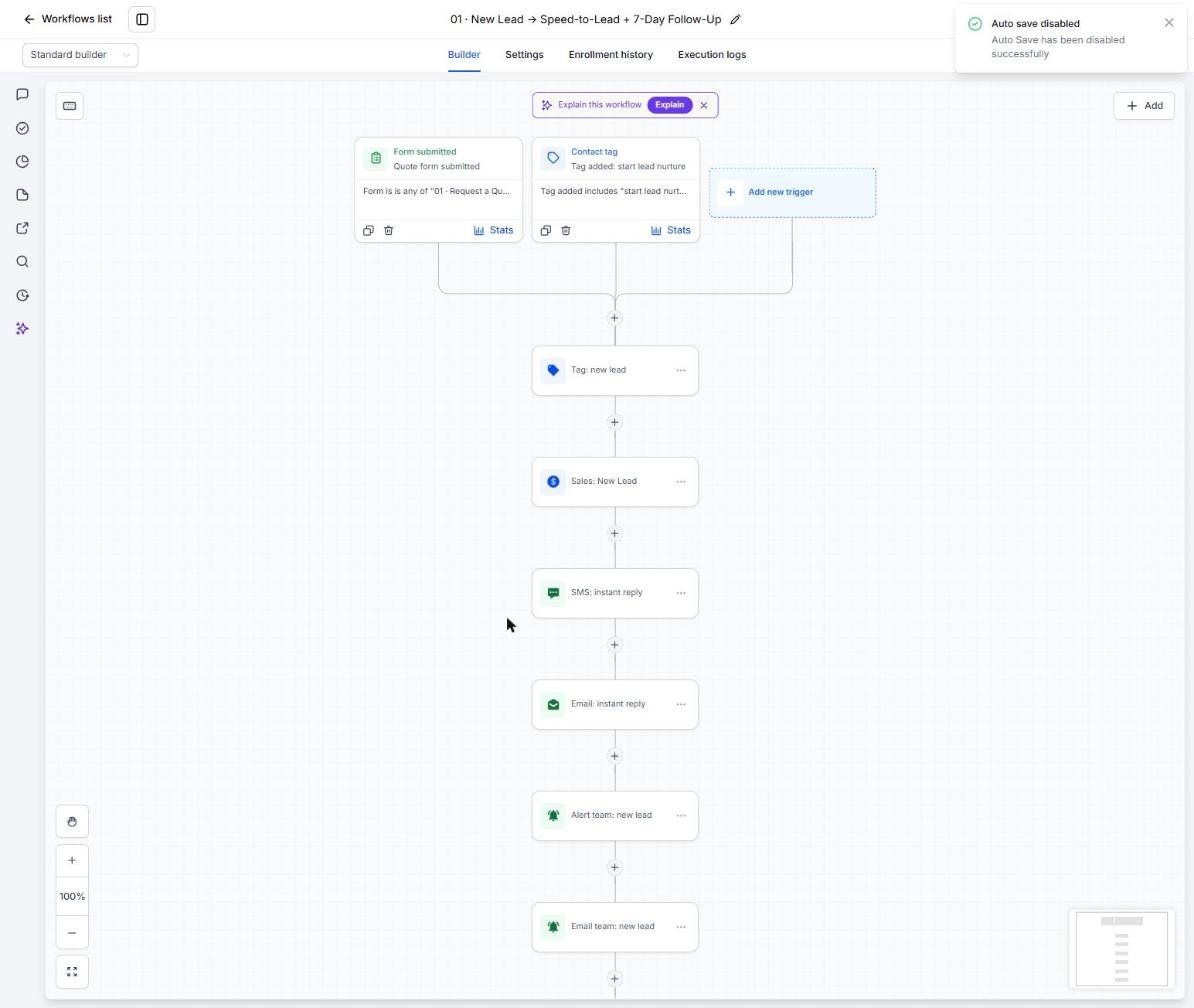
All 21 workflows, step by step
Open any workflow to see its trigger, every step and a sample message. Each one is installed and fully written.
01 · New Lead → Speed-to-Lead + 7-Day Follow-Up
Texts and emails every new buyer or seller lead instantly, asks buy or sell, and follows up for 7 days.
Form 01 submitted, or tag 'start lead nurture' added
- Tag new lead
- Create opportunity in Sales Pipeline → New Lead
- Instant SMS reply with booking link
- Instant email: what happens next
- Text + email alert to the team
- Day 1 SMS follow-up
- Day 2 email: why customers choose you
- Day 4 SMS: quick question
- Day 7 email: close the loop
- Move to Long-Term Nurture
Stops when the lead replies
02 · Missed Call → Instant Text-Back
Texts callers back within seconds when you're at a showing or closing.
Inbound call is busy, no-answer or voicemail
- Text-back within seconds
- Create opportunity → New Lead (source: missed call)
- Text alert to the team
Runs every time
03 · Customer Replied → Hot Lead Alert
Pings you the moment a lead replies so you can call while they're engaged.
Customer replies (SMS, email, chat)
- Tag hot lead
- Text the team the reply so nobody waits
Runs every time
04 · Appointment Booked → Confirm + Reminders
Confirms buyer and seller consultations, tells them what to prepare, and sends reminders.
Customer books on the calendar
- Tag appointment booked
- Move deal → Appointment Booked
- Confirmation SMS + email with reschedule link
- Team alert
- 24-hour reminder SMS
- 2-hour reminder SMS
Runs for every booking
05 · No-Show → Reschedule Recovery
Follows up with leads who miss a consultation and offers a phone or video option.
Appointment status changes to No-show
- Tag no-show
- Sorry-we-missed-you SMS + email with booking link
- Team alert
- Day 1 rebook SMS
- Day 3 final SMS
Stops when they reply
06 · Appointment Completed → Proposal Prep
Thanks the lead after the consultation and reminds you to send the listing proposal or buyer plan within 24 hours.
Appointment status changes to Showed
- Move deal → Appointment Completed
- Thank-you SMS
- Team alert: send the proposal within 24 hours
Runs every time
07 · Proposal Sent → Follow-Up Sequence
Follows up on your listing proposal or buyer plan and asks for the signed agreement.
Deal moves to Proposal Sent
- Day 1 SMS check-in
- Day 3 email: questions?
- Day 6 SMS: hold your spot
- Day 13 final email
- Team alert if still no answer
Stops when they reply
08 · Deal Won → Welcome + Customer Journey
Welcomes new clients with a clear road map from prep to closing.
Deal moves to Won
- Tag customer, remove lead tags
- Create Customer Journey deal → Scheduled
- Welcome SMS
- Welcome email: what happens next
- Team alert
Runs every time
09 · Deal Lost → 30/60/90-Day Nurture
Keeps in touch with leads who didn't sign, with a home value update offer at 90 days.
Deal moves to Lost
- Tag lost
- Day 30 check-in email
- Day 60 SMS
- Day 90 email with comeback offer
- Move to Long-Term Nurture
Stops when they reply
10 · Job Completed → Feedback Request
Congratulates clients on closing and asks how the experience was.
Customer Journey deal moves to Completed
- Move → Feedback Requested
- Tag review requested
- SMS + email asking for a private rating
- Day 2 reminder SMS
Runs every time
11 · Feedback Submitted → Review Ask or Service Recovery
Sends happy clients to your Google review link and routes concerns privately to you.
Form 02 submitted
- If rating is 4-5: tag promoter, send Google review link, move → 5-Star Reviewed
- If rating is 1-3: tag detractor, apology message, urgent team alert to fix it privately
Runs every time
12 · Happy Customer → Referral Request
Asks happy clients to introduce friends and neighbors who are thinking about a move.
Tag promoter added
- Wait 3 days
- Referral SMS with reward
- Referral email with reward
Once per contact
13 · Referral Received → Thank You + Team Alert
Thanks the client for the referral and alerts you to call the new lead the same day.
Form 03 submitted
- Move referrer → Referral Partner
- Tag referral partner
- Thank-you SMS
- Team alert with the friend's name and phone
Runs every time
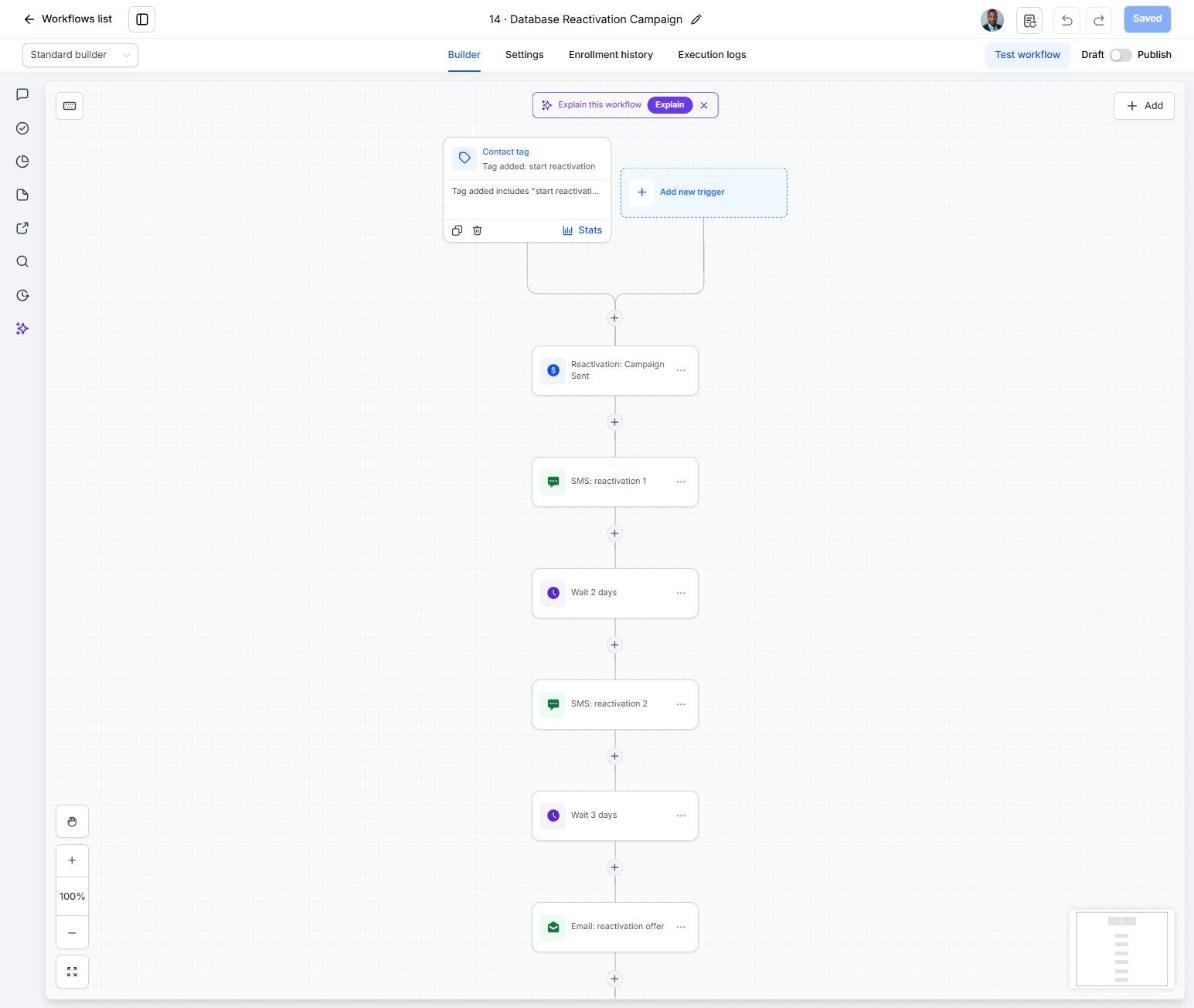
14 · Database Reactivation Campaign
Re-engages old leads and your sphere with a free home value update.
Tag 'start reactivation' added (bulk-tag an imported list)
- Create Reactivation deal → Campaign Sent
- SMS 1: still looking for help?
- Day 2 SMS: past-customer offer
- Day 5 email offer
- Day 10 last-call SMS
- Remove the campaign tag
Stops when they reply
15 · Invoice Sent → Payment Reminders
Sends polite reminders for any unpaid invoices, such as rental or consulting fees.
Invoice sent
- Wait 3 days
- Friendly SMS reminder
- Day 6 email reminder
- Day 10 team alert for a personal call
Payments workflow (16) stops it when the invoice is paid
16 · Payment Received → Thank You
Confirms payments with a quick thank-you.
Payment received
- Tag customer, remove past-due tag
- Thank-you SMS
- Team alert
Runs every time
17 · Birthday → Gift Offer
Sends past clients and sphere contacts a warm birthday note.
Contact's birthday (date of birth on file)
- Birthday SMS with gift offer
- Birthday email
Yearly
18 · Stale Deal Alert (7 Days No Movement)
Flags buyer and seller leads that have sat untouched for a week.
Sales Pipeline deal idle 7+ days
- Text + email alert to the team
Runs every time
19 · Service Due → Rebook Reminder
Celebrates each client's home anniversary with an updated home value report.
Tag 'service due' added
- Service-due SMS with offer
- Day 3 email
- Day 7 final SMS
- Remove the tag
Stops when they reply
In real estate: The home anniversary: once a year on the client's Closing Date, past buyers get an updated home value report. Build a smart list or date-based trigger on Closing Date and tag them 'service due' each year.
20 · Seasonal Promo Campaign
Runs the spring seller campaign with a market report and pre-listing game plan.
Tag 'seasonal promo' added
- Offer SMS
- Day 2 email
- Day 5 last-call SMS
- Remove the tag
Stops when they reply
In real estate: Spring seller campaign offering a market report and pre-listing game plan. Launch in January and February so sellers can prep and list in March through May; rerun a lighter version in late summer for fall listings.
21 · Home Value Request → Seller Conversion
Turns home value requests into listing appointments with a sequence built for sellers.
Tag 'niche campaign' added
- Niche SMS
- Day 2 email
- Day 5 follow-up SMS
- Remove the tag
Stops when they reply
In real estate: Converts home value (CMA) requests into listing appointments, the highest-value lead an agent gets. Tag anyone who requests a home valuation 'niche campaign' (from the valuation form, a landing page or a lead source); the sequence confirms the report is coming, explains why a walkthrough gives a better number and asks for the in-person visit, stopping as soon as they reply.
Launch your next real estate client this week
One-time $397. Includes the snapshot, both PDFs, the walkthrough and the mini-course. Or get all 20 niches for $1,997.