
Real Estate snapshot setup guide
Install, brand and launch the snapshot in about an hour. Follow the steps in order.
Setup checklist
Load the snapshot
Open the snapshot share link while logged in to your agency to import it. Go to Account Snapshots > Imported Snapshots, open the actions menu on the Real Estate snapshot and choose Push to Sub-Account, or pick it when creating a sub-account under Sub-Accounts > Create Sub-Account.
Complete the business profile
In the agent's sub-account, go to Settings > Business Profile. Add the agent or team name, brokerage, address, phone, logo and time zone.
Fill in custom values
Go to Settings > Custom Values and update the business name, the agent's name as owner, phone and service area. Confirm the lead offer, referral reward and seasonal offer comply with the agent's state rules and brokerage policy.
Add brokerage disclosures
Most states require the brokerage name on all advertising. Add the brokerage name, license number and Equal Housing Opportunity statement to the email signature under Settings > My Profile or the user's signature settings.
Connect the phone number and register A2P
Go to Settings > Phone Numbers to buy or port a number, then complete A2P 10DLC registration in the Trust Center. Use a marketing plus customer care use case with sample messages from this snapshot.
Set up email sending
Go to Settings > Email Services and add a dedicated sending domain such as mail.agentname.com. Verify the DNS records so emails reach the inbox.
Configure the consultation calendar
Go to Calendars > Calendar Settings, edit Buyer & Seller Consultation, set availability around showings and add video meeting options. Copy the booking link into the booking_link custom value.
Customize the forms and route portal leads
Go to Sites > Forms > Builder to review the lead form, then embed it on the website. Route Zillow, Realtor.com and other portal leads into GHL with Zapier or email parsing so they trigger workflow 01.
Review the pipelines
Go to Opportunities > Pipelines and walk through Consultation Booked, Consultation Completed and Listing Proposal / Buyer Plan Sent. Move cards to Won when the listing or buyer agreement is signed.
Connect Google reviews
Go to Settings > Integrations and connect the agent's Google Business Profile. Confirm the review link under Reputation > Settings and paste it into the review_link custom value.
Set up home value and anniversary triggers
Make sure home valuation requests get tagged 'niche campaign' (from the valuation form or a lead-source rule). Import past clients with their Closing Date and build an annual trigger that tags them 'service due' on their home anniversary.
Go live test
Publish all workflows under Automation > Workflows, then submit the form as a test lead, call the number and let it ring out, and book a test consultation. Check Conversations for every message and confirm alerts reached the agent, then delete the test contact.
Custom values: fill these once
All 21 workflows pull from these values, so your client's name, links and offers show up everywhere. Pre-filled real estate defaults are shown; replace the business details.
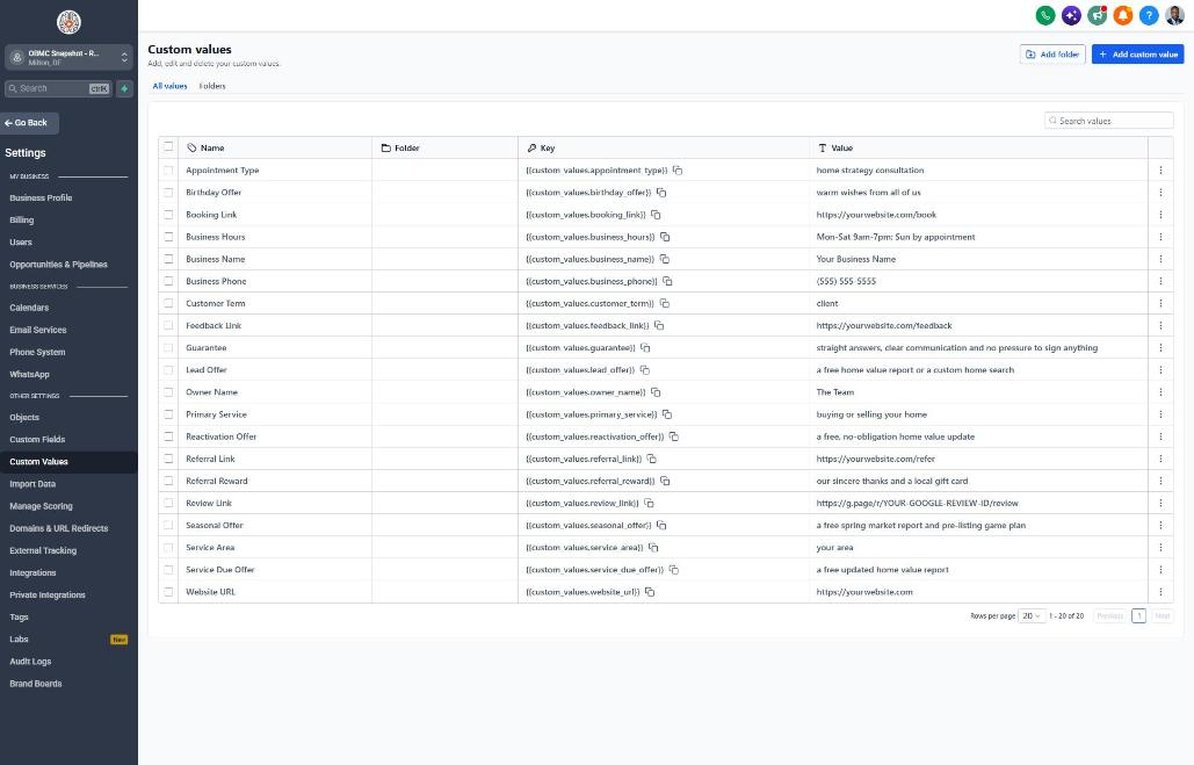
| Custom value | Real Estate default |
|---|---|
| Business Name | Your value |
| Business Phone | Your value |
| Owner Name | Your value |
| Website URL | Your value |
| Booking Link | Your value |
| Review Link | Your value |
| Feedback Link | Your value |
| Referral Link | Your value |
| Service Area | Your value |
| Customer Term | client |
| Appointment Type | home strategy consultation |
| Primary Service | buying or selling your home |
| Lead Offer | a free home value report or a custom home search |
| Guarantee | straight answers, clear communication and no pressure to sign anything |
| Referral Reward | our sincere thanks and a local gift card |
| Reactivation Offer | a free, no-obligation home value update |
| Seasonal Offer | a free spring market report and pre-listing game plan |
| Service Due Offer | a free updated home value report |
| Birthday Offer | warm wishes from all of us |
| Business Hours | Mon-Sat 9am-7pm; Sun by appointment |
KPIs to track every week
| Metric | Goal | Where in GoHighLevel |
|---|---|---|
| Speed to lead | Reply to every new lead within 5 minutes, including evenings and weekends | Conversations and opportunity timelines in the Sales Pipeline |
| Lead-to-appointment rate | Grow the share of new leads that book a consultation every quarter | Opportunities > Pipelines, New Lead vs Consultation Booked |
| Home value requests to listing appointments | Turn a steady share of valuation requests into in-person walkthroughs | Automation > Workflows > 21 > Execution Logs and the Sales Pipeline |
| Agreements signed | Hit the monthly goal for signed listing and buyer agreements | Opportunities > Pipelines, Won stage and the Dashboard |
| Sphere conversations | Start new conversations with past clients and old leads every month | Reactivation pipeline and Conversations |
| New Google reviews | Ask every closed client and earn new reviews every month | Reputation > Overview |
Campaign ideas for your client
- Free home value report with an optional in-person walkthrough
- Spring market report and pre-listing game plan for sellers
- First-time buyer workshop co-hosted with a local lender
- Annual home anniversary equity update for past clients
- Downsizing or relocation consultation for move-up and move-down sellers
Compliance notes
- Fair Housing: never describe neighborhoods, schools or 'ideal' buyers in ways that could steer by race, religion, national origin, sex, disability, familial status or other protected classes. Keep copy about the property, market and process.
- Brokerage advertising rules: most states require the brokerage name and often license details on emails, texts and ads. Add them to the signature and landing pages.
- Referral rewards: many states restrict giving gifts or compensation to unlicensed people for referrals. Confirm with the broker that the Referral Reward is allowed, or change it to a simple thank-you.
- TCPA and A2P 10DLC: only text leads who gave consent on your form or texted you first, keep 'Reply STOP to opt out' on first messages, and register A2P before sending. Purchased lead lists usually lack valid consent.
- Value reports: present home value reports as estimates or opinions of value, not appraisals, and don't promise a sale price or time on market.
This is general guidance, not legal advice. Confirm the rules for your client's state and industry.