
Mortgage snapshot setup guide
Install, brand and launch the snapshot in about an hour. Follow the steps in order.
Setup checklist
Load the snapshot
Open the snapshot share link while logged in to your agency to import it. Go to Account Snapshots > Imported Snapshots, open the actions menu on the Mortgage snapshot and choose Push to Sub-Account, or pick it when creating a sub-account under Sub-Accounts > Create Sub-Account.
Complete the business profile
In the loan officer's sub-account, go to Settings > Business Profile. Add the loan officer or company name, address, phone, logo and time zone.
Fill in custom values
Go to Settings > Custom Values and update the business name, the loan officer's name as owner, phone and service area. Keep offers free of rates, payments and guarantees, and keep the Referral Reward non-monetary.
Add required disclosures
Add the individual and company NMLS IDs, licensing states and an Equal Housing Opportunity or Equal Housing Lender statement to the email signature under Settings > My Profile or the user's signature settings, and to any landing pages.
Get compliance approval
Export or screenshot the workflow messages from Automation > Workflows and send them to the lender's compliance team before publishing. Adjust any wording they flag.
Connect the phone number and register A2P
Go to Settings > Phone Numbers to buy or port a number, then complete A2P 10DLC registration in the Trust Center. Describe the use case accurately (mortgage inquiries, appointment reminders and client updates) and include sample messages.
Set up email sending
Go to Settings > Email Services and add a dedicated sending domain such as mail.lendername.com. Verify the DNS records so emails reach the inbox.
Configure the strategy call calendar
Go to Calendars > Calendar Settings, edit Pre-Approval Strategy Call, set availability including some evenings, and add a phone or video meeting option. Copy the booking link into the booking_link custom value.
Customize the forms and partner links
Go to Sites > Forms > Builder to review the lead and referral forms, then embed them on the website. Create a link for each realtor partner so the Referring Agent field fills in automatically.
Review the pipelines
Go to Opportunities > Pipelines and walk through Strategy Call Booked, Application Started and Pre-Approval Issued. Move cards to Won when the buyer goes under contract or a refinance application is locked.
Set up anniversary and rate-watch tagging
Import past clients with Loan Closing Date and Current Interest Rate. Build a yearly date trigger that tags them 'service due', and a smart list by rate so you can tag the right group 'niche campaign' when rates move.
Go live test
Connect the Google Business Profile under Settings > Integrations, publish all workflows, then submit the form as a test lead, call the number and let it ring out, and book a test call. Check Conversations for every message, then delete the test contact.
Custom values: fill these once
All 21 workflows pull from these values, so your client's name, links and offers show up everywhere. Pre-filled mortgage defaults are shown; replace the business details.
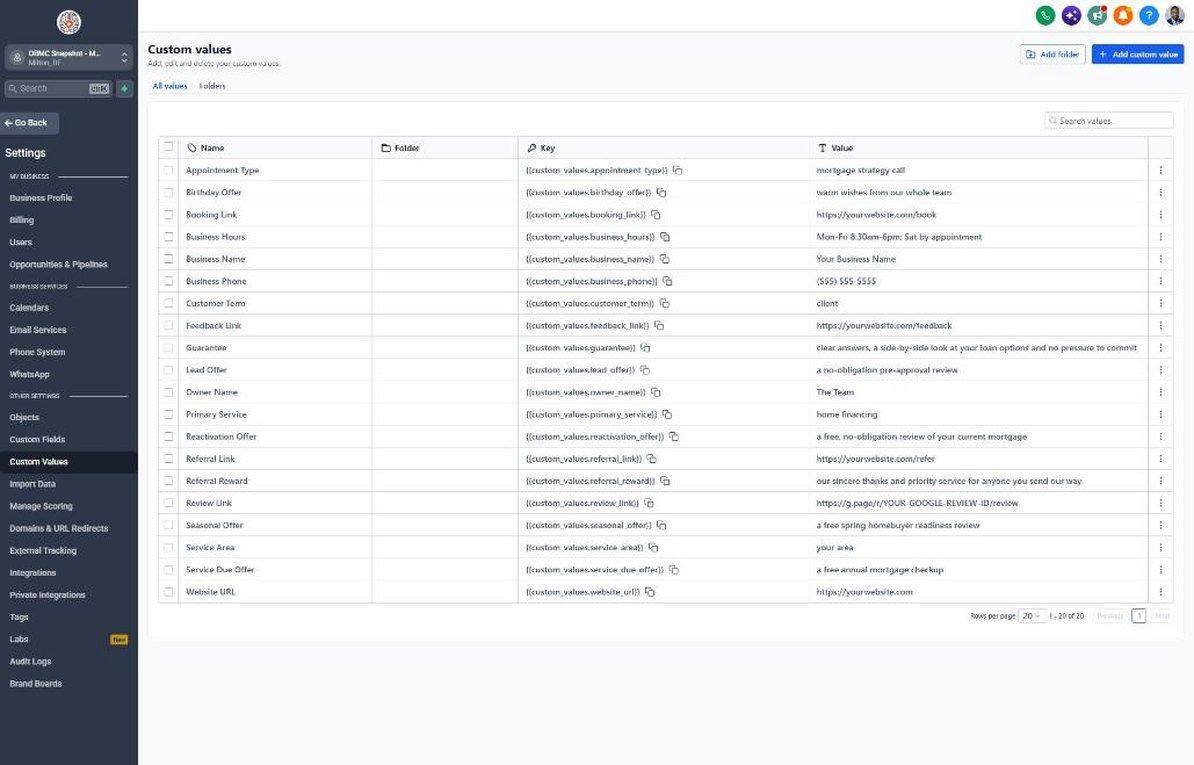
| Custom value | Mortgage default |
|---|---|
| Business Name | Your value |
| Business Phone | Your value |
| Owner Name | Your value |
| Website URL | Your value |
| Booking Link | Your value |
| Review Link | Your value |
| Feedback Link | Your value |
| Referral Link | Your value |
| Service Area | Your value |
| Customer Term | client |
| Appointment Type | mortgage strategy call |
| Primary Service | home financing |
| Lead Offer | a no-obligation pre-approval review |
| Guarantee | clear answers, a side-by-side look at your loan options and no pressure to commit |
| Referral Reward | our sincere thanks and priority service for anyone you send our way |
| Reactivation Offer | a free, no-obligation review of your current mortgage |
| Seasonal Offer | a free spring homebuyer readiness review |
| Service Due Offer | a free annual mortgage checkup |
| Birthday Offer | warm wishes from our whole team |
| Business Hours | Mon-Fri 8:30am-6pm; Sat by appointment |
KPIs to track every week
| Metric | Goal | Where in GoHighLevel |
|---|---|---|
| Speed to lead | Reply to every new lead within 5 minutes, including evenings | Conversations and opportunity timelines in the Sales Pipeline |
| Lead-to-application rate | Grow the share of new leads that start an application every quarter | Opportunities > Pipelines, New Lead vs Application Started |
| Pre-approval to contract | Keep pre-approved buyers with you through to their accepted offer | Opportunities > Pipelines, Pre-Approval Issued vs Won |
| Realtor referrals | Track referrals by partner and grow the number of active referring agents | Contacts filtered by Referring Agent and the Referral Partner stage |
| Refinance reviews booked | Book review calls from every rate-watch send | Automation > Workflows > 21 > Execution Logs and Calendars > Appointments |
| New Google reviews | Ask every closed client and earn new reviews every month | Reputation > Overview |
Campaign ideas for your client
- No-obligation pre-approval review for purchase buyers
- First-time homebuyer workshop co-hosted with a realtor partner (with costs split per RESPA)
- Annual mortgage checkup for past clients on their loan anniversary
- Rate-watch list: past clients and leads opt in to hear when a refinance might be worth reviewing
- Spring homebuyer readiness review for renters and early-stage buyers
Compliance notes
- No rate promises or guarantees: never state or imply a specific rate, payment, approval or savings in automated messages. Quoting rates or payments in ads can trigger Regulation Z disclosure requirements, so leave pricing to one-on-one conversations.
- Equal housing and fair lending: include an Equal Housing Opportunity or Equal Housing Lender statement and NMLS IDs on emails and landing pages, and never target or discourage applicants based on protected characteristics.
- RESPA Section 8: don't give cash, gift cards or anything of value for referrals of mortgage business, from clients or realtor partners. Co-marketing with agents must split costs in proportion to each party's share.
- Data security: never request Social Security numbers, account numbers or loan documents by SMS or email. Send borrowers to your secure portal or LOS for documents.
- TCPA and A2P 10DLC: only text leads with documented consent, keep 'Reply STOP to opt out' on first messages, complete A2P registration with an accurate financial-services use case, and get the lender's compliance approval before launch.
This is general guidance, not legal advice. Confirm the rules for your client's state and industry.