
Auto snapshot setup guide
Install, brand and launch the snapshot in about an hour. Follow the steps in order.
Setup checklist
Load the snapshot
In Agency view, go to Account Snapshots > Imported Snapshots and load the Auto snapshot into a new or existing sub-account. Open the sub-account when the import completes.
Fill in the business profile
Go to Settings > Business Profile and enter the shop's name, address, phone, website and time zone. Reminders send based on this time zone.
Set your custom values
Go to Settings > Custom Values and fill in Business Name, Owner Name, Business Phone, Service Area and the four links. Set Primary Service to repair, detailing or both, and adjust the offers to match the shop's pricing.
Connect a phone number and register A2P
Go to Settings > Phone Numbers, buy or port the shop's number, and complete A2P 10DLC registration in the Trust Center tab using the legal business name and EIN. Wait for approval before sending campaigns.
Connect email sending
Go to Settings > Email Services, add a dedicated sending domain and add the DNS records it gives you. Verify before sending reminders.
Configure the appointment calendar
Go to Calendars > Calendar Settings and open "Service Appointment." Set slot length and availability to match bay capacity and limit appointments per slot so you don't overbook. Copy the booking link into the Booking Link custom value.
Review the pipelines
Go to Opportunities > Pipelines and confirm the Service Booked, Vehicle Inspected and Estimate Sent stages. Enter estimate totals as opportunity values to track open repair dollars.
Connect Google reviews
Go to Settings > Integrations and connect Google Business Profile, then copy the review link from Reputation > Settings into the Review Link custom value.
Customize and embed the service form
Go to Sites > Forms > Builder and open "01 · Request a Quote / Booking Request." Confirm vehicle, mileage and drop-off questions are included and embed it on the website's appointment page.
Import customers and declined work
Export customers from your shop management system with last visit date, mileage and declined work. Import in Contacts > Import, mapping Declined Work, Declined Work Estimate, Last Service Date and Next Service Due. Only import customers who agreed to receive texts.
Publish the workflows
Go to Automation > Workflows, review the copy and publish. Start with 01, 02, 04, 05, 10 and 11, then 19 and 21. Trigger Workflow 21 by adding the 'niche campaign' tag to customers with declined work.
Go live test
Submit the service form with your own info, call the shop number and let it ring out, and book a test appointment. Confirm each text, email and team alert arrives, then delete the test contact.
Custom values: fill these once
All 21 workflows pull from these values, so your client's name, links and offers show up everywhere. Pre-filled auto defaults are shown; replace the business details.
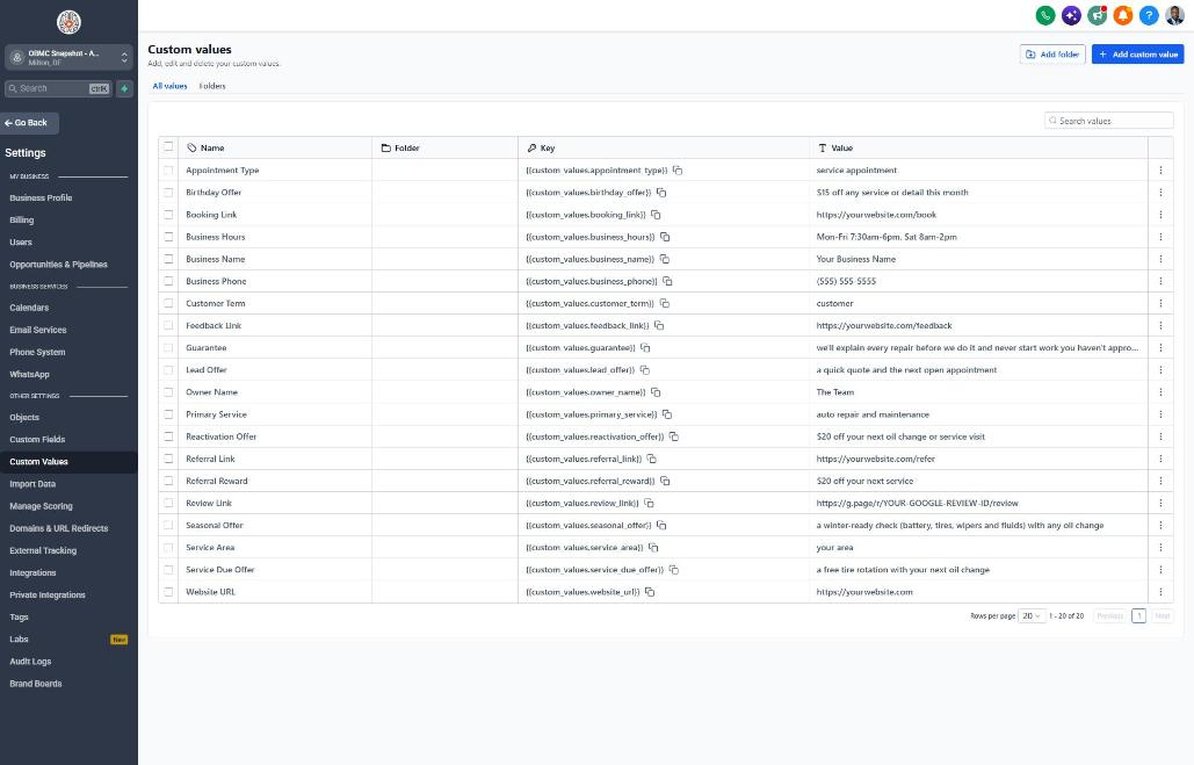
| Custom value | Auto default |
|---|---|
| Business Name | Your value |
| Business Phone | Your value |
| Owner Name | Your value |
| Website URL | Your value |
| Booking Link | Your value |
| Review Link | Your value |
| Feedback Link | Your value |
| Referral Link | Your value |
| Service Area | Your value |
| Customer Term | customer |
| Appointment Type | service appointment |
| Primary Service | auto repair and maintenance |
| Lead Offer | a quick quote and the next open appointment |
| Guarantee | we'll explain every repair before we do it and never start work you haven't approved |
| Referral Reward | $20 off your next service |
| Reactivation Offer | $20 off your next oil change or service visit |
| Seasonal Offer | a winter-ready check (battery, tires, wipers and fluids) with any oil change |
| Service Due Offer | a free tire rotation with your next oil change |
| Birthday Offer | $15 off any service or detail this month |
| Business Hours | Mon-Fri 7:30am-6pm, Sat 8am-2pm |
KPIs to track every week
| Metric | Goal | Where in GoHighLevel |
|---|---|---|
| Speed to lead | Aim to respond to new service requests within 5 minutes during shop hours | Conversations and contact activity |
| Declined work recovered | Track the dollar value of declined work approved after Workflow 21 and grow it monthly | Opportunities > Sales Pipeline Won deals, plus Workflow 21 stats |
| Estimate approval rate | Track monthly and aim to improve it each quarter | Opportunities > Sales Pipeline, Estimate Sent to Won |
| Service-due rebook rate | Aim to rebook a growing share of customers reminded by Workflow 19 | Automation > Workflows > 19 enrollment and goal stats |
| Google reviews | Aim for new reviews every week | Reputation > Overview |
| No-show recovery | Rebook most no-shows within a week | Workflow 05 stats and the Calendars appointment list |
Campaign ideas for your client
- Free re-check on any previously declined repair
- Seasonal vehicle check included with any oil change
- Maintenance club: discounted oil changes and rotations with a prepaid plan
- Detail plus ceramic coating bundle with a 6-month maintenance detail included
- Family and friends referral credit on the next service
Compliance notes
- Register A2P 10DLC before sending texts. Describe the use case as appointment reminders, service-due reminders, estimate follow-up and promotions.
- Service reminders to existing customers and marketing promos have different consent requirements under the TCPA. Collect written consent to text at drop-off or on the service form.
- Keep declined-work messages factual. Don't describe a vehicle as unsafe by text unless your technician documented it, and never pressure customers into repairs.
- Follow your state's auto repair rules on written estimates and customer authorization before work begins.
- Send campaigns between 8am and 8pm in the customer's local time and honor STOP replies immediately.
This is general guidance, not legal advice. Confirm the rules for your client's state and industry.