
Turn Declined Estimates and Overdue Customers Into Full Bays
A done-for-you GoHighLevel system for repair shops and detailers that texts back missed calls, follows up on declined work and reminds customers when service is due.
Where auto businesses lose money
An independent repair shop or detailing business that sells oil changes and maintenance, diagnostics, brakes and repairs, plus detailing packages and ceramic coatings. Bays sit empty on slow days while a stack of declined estimates and customers overdue for service never get a follow-up call.
- Phones ring while techs are under a car, and callers go to the next shop
- Declined work sits in the system and nobody follows up on it
- Customers drift to quick-lube chains because no one reminded them they were due
- Slow days leave bays empty while past customers have no reason to come back
- The shop does honest work but has fewer Google reviews than the dealer down the road
What this snapshot fixes, automatically
Every missed call gets a text back within seconds
Declined estimates get a respectful, automatic follow-up with a free re-check
Customers get service reminders based on time and mileage
Lapsed customers get a reason to come back on slow weeks
Happy customers are asked for a Google review right after pickup
Everything you need to launch auto clients
- 21 pre-built workflows written for auto repair shops and detailers
- Declined work follow-up campaign with free re-check and staged-repair options
- Service-due reminders by time or mileage
- Estimate follow-up sequence that prioritizes safety items and offers staging
- Missed-call text-back for busy service counters
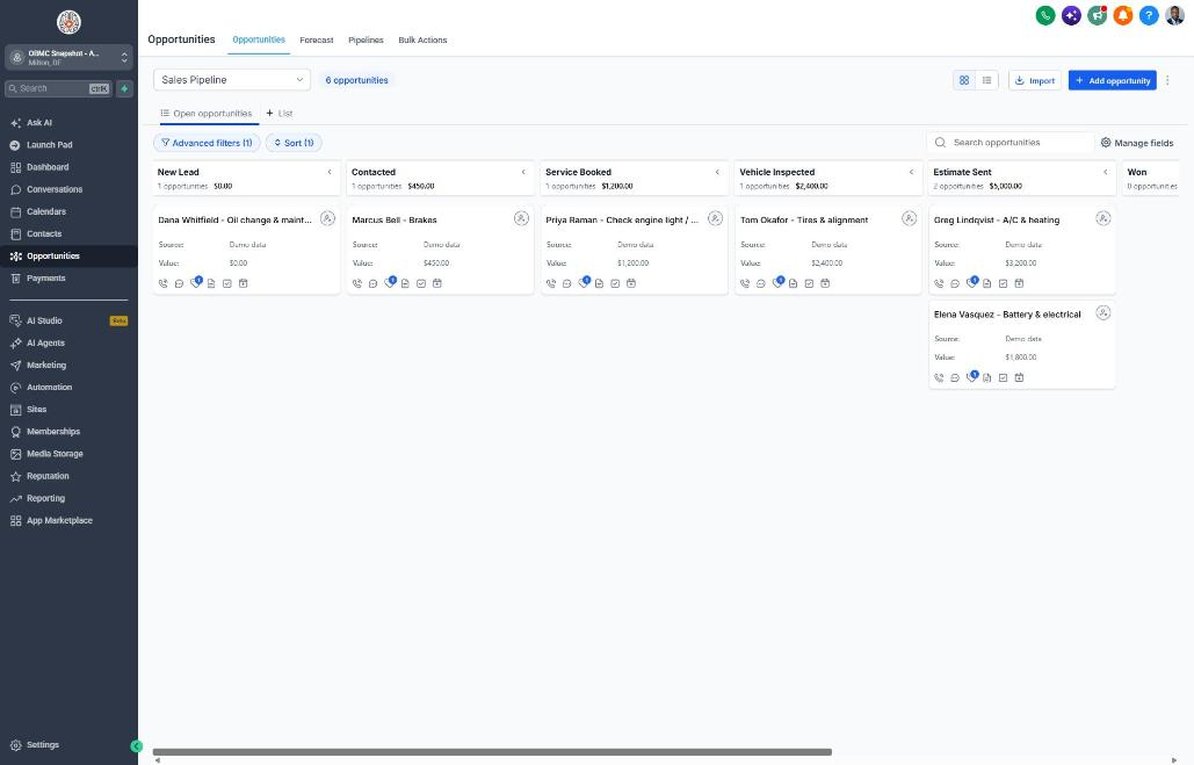
- Sales pipeline with Service Booked, Vehicle Inspected and Estimate Sent stages
- Customer Journey from Vehicle Scheduled to Vehicle Picked Up and Referral Partner
- Winter-ready and spring seasonal check campaigns
- Service request form asking vehicle, mileage and drop-off preference
- 7 auto custom fields including declined work, estimate value and next service mileage
- Review request with private service recovery for unhappy customers
- Reactivation campaign for customers you haven't seen in months
- Setup guide, 6-lesson course outline and agency sales kit
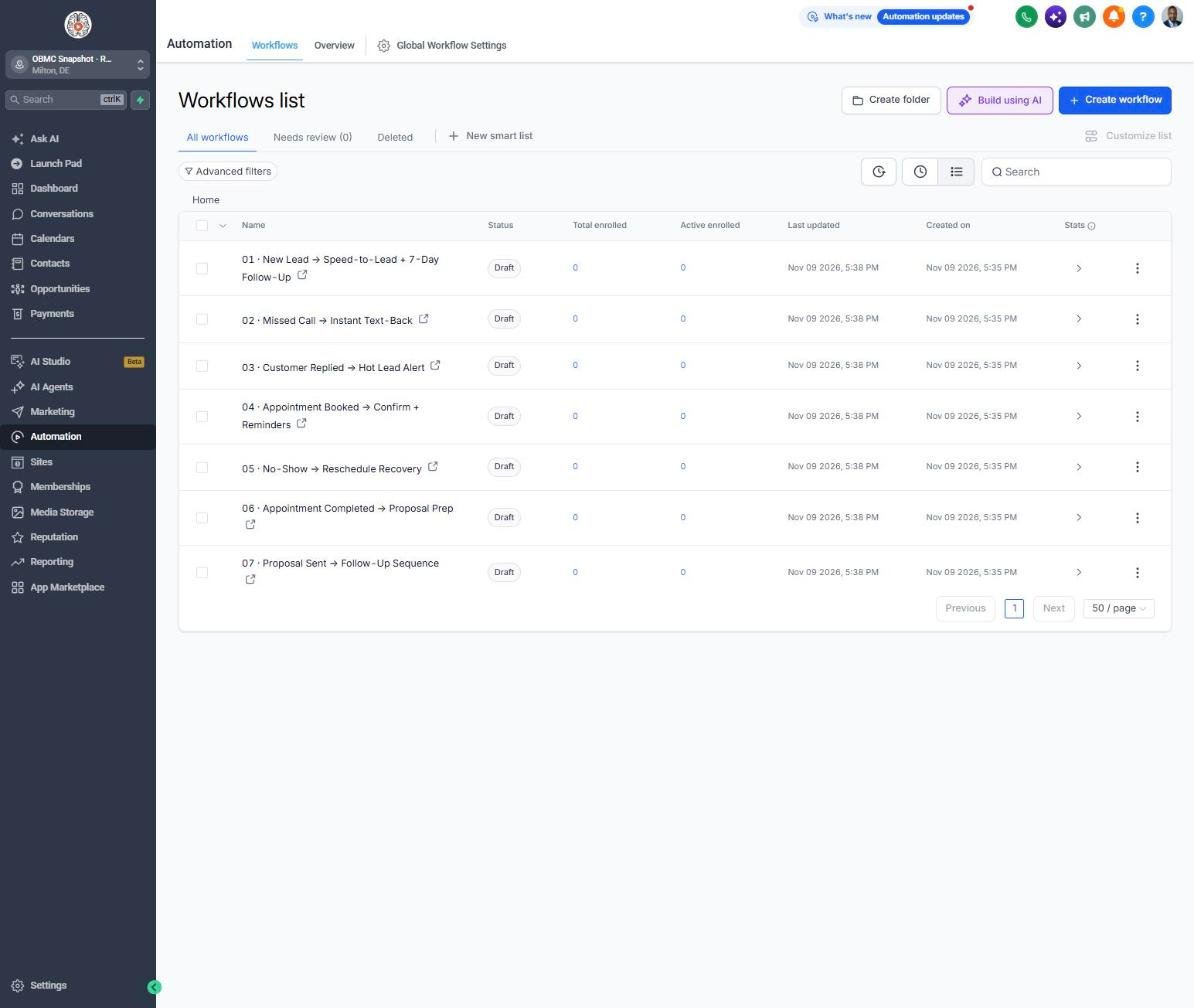
The complete auto follow-up engine
Every workflow is built, written for the niche and wired to the pipelines. Your client fills in their business details once, and the copy updates everywhere.
New Lead → Speed-to-Lead + 7-Day Follow-Up
Replies to new service requests instantly, asks about the vehicle and follows up until the appointment is booked.
Missed Call → Instant Text-Back
Texts back callers the service counter couldn't answer so they don't call the next shop.
Customer Replied → Hot Lead Alert
Alerts the service writer the moment a customer replies.
Appointment Booked → Confirm + Reminders
Confirms the appointment and reminds the customer to note symptoms and bring the wheel lock key.
No-Show → Reschedule Recovery
Rebooks customers who missed their appointment before they go elsewhere.
Appointment Completed → Proposal Prep
Lets the customer know the estimate is coming and reminds the team to send it promptly.
Proposal Sent → Follow-Up Sequence
Follows up on repair estimates, explains what's urgent and offers to stage the work.
Deal Won → Welcome + Customer Journey
Confirms approved work and sets expectations for updates and pickup.
Deal Lost → 30/60/90-Day Nurture
Keeps in touch with customers who didn't approve work and invites them back.
Job Completed → Feedback Request
Asks how the vehicle is running after pickup.
Feedback Submitted → Review Ask or Service Recovery
Sends happy customers to Google and alerts the owner to any complaint so it can be fixed fast.
Happy Customer → Referral Request
Asks satisfied customers to refer friends and family for a service credit.
Referral Received → Thank You + Team Alert
Thanks the referrer and alerts the team to call the new customer.
Database Reactivation Campaign
Brings back customers you haven't seen in months with a service offer.
Invoice Sent → Payment Reminders
Sends polite reminders on unpaid repair or fleet invoices.
Payment Received → Thank You
Thanks the customer and clears the past-due tag.
Birthday → Gift Offer
Sends a birthday discount on any service or detail.
Stale Deal Alert (7 Days No Movement)
Alerts the service writer when an estimate hasn't moved in a week.
Service Due → Rebook Reminder
Reminds customers when maintenance is due by time or mileage.
Seasonal Promo Campaign
Runs a winter-ready or spring vehicle check promotion to the whole list.
Declined Work Follow-Up
Follows up on recommended repairs the customer declined, with a free re-check and option to stage the work.
Know exactly where every deal stands
Sales Pipeline
Customer Journey
Reactivation
Training that makes it easy to sell and install
Setup guide
A 12-step install checklist with exact GoHighLevel menu paths.
Open guide → 🧭Walkthrough
Every workflow, trigger, message and pipeline stage explained.
See walkthrough → 🎓Mini-course
6 short visual lessons, from install to launch.
Start lesson 1 → 💼Agency sales kit (PDF)
Pitch script, cold outreach, pricing and KPIs to sell this niche.
Download →Built for agencies serving auto
- Agencies that market independent repair shops, tire shops and detailers
- Shop owners with a list of declined estimates and no time to call through it
- Detailing businesses that want repeat maintenance details and coating top-ups
- Multi-bay shops that want fewer empty bays on slow days
Open with the declined work follow-up: it uses data the shop already has, so the owner sees approved work quickly. Retain the shop with monthly service-due reminders and seasonal check campaigns that keep bays full year-round.
Suggested resale: setup $500-$1,500 + $297-$797/mo
Questions agencies ask
Do I need a GHL account?
Yes. This is a GoHighLevel snapshot, so you need a GHL plan that supports snapshots and workflows. It loads into any sub-account in minutes.
What's not included?
Your GHL subscription, phone number and messaging fees, A2P registration fees, ad spend and shop management software. There's no direct integration with your shop management system included, and no customer data.
Do I need a phone number and A2P registration?
Yes. Texting from GHL in the US requires a LeadConnector number and an approved A2P 10DLC registration. The setup guide walks through it.
Does it connect to my shop management software?
Not out of the box. Most shops export customers, last visit date, mileage and declined work as a CSV and import it, or connect their system through Zapier or webhooks if it supports them.
Can I use it for detailing only?
Yes. Change the Primary Service and offer custom values and use the Detail Package field. Service-due reminders work well for maintenance details and coating check-ups.
How do mileage reminders work?
Record Current Mileage and Next Service Mileage at each visit and set a Next Service Due date based on the customer's typical driving. Workflow 19 runs when you add the 'service due' tag, either manually or with a date-based trigger.
Can I edit the offers and messages?
Yes. Offers live in Settings > Custom Values, and every message can be edited in Automation > Workflows.
Launch your next auto client this week
One-time $397. Includes the snapshot, both PDFs, the walkthrough and the mini-course. Or get all 20 niches for $1,997.