
Tax & Accounting snapshot setup guide
Install, brand and launch the snapshot in about an hour. Follow the steps in order.
Setup checklist
Load the snapshot
In Agency view, go to Account Snapshots, find the OBMC Tax & Accounting snapshot, and click Load into the firm's sub-account. Import all assets, then switch into the sub-account.
Fill in the business profile
Go to Settings > Business Profile and enter the firm name, address, phone, website, and time zone. Add credentials, such as CPA or EA, to the business description where appropriate.
Update custom values
Go to Settings > Custom Values and update Business Name, Owner Name, Business Phone, Booking Link, Review Link, Feedback Link, and Referral Link. Adjust Business Hours to show extended tax season hours.
Connect a phone number and register A2P
Go to Settings > Phone Numbers to buy or port a number, then complete A2P 10DLC registration in Settings > Phone Numbers > Trust Center. Turn on call forwarding to the front desk so missed-call text-back covers peak season.
Set up email sending
Go to Settings > Email Services and connect a dedicated sending domain. Add the DNS records, verify, and use the firm's name as the from name so clients recognize it and don't mistake it for phishing.
Configure the consultation calendar
Go to Calendars > Calendar Settings, open Free Tax Consultation, assign preparers, and set availability with separate hours for tax season if needed. Copy the calendar link into the Booking Link custom value.
Customize the consultation form
Go to Sites > Forms > Builder and open the consultation form. Confirm Client Type, Tax Year(s) Needed, and IRS or State Notice Received, add consent language, and embed it on the website.
Add your secure portal link
In Automation > Workflows, open workflows 08 and 21 and add your secure portal URL as a button or link in the emails. Never replace it with an email or text upload option.
Review the pipelines
Go to Opportunities > Pipelines and review the client, return journey, and reactivation pipelines. Make sure Documents Requested and Return In Preparation match how your team tracks work.
Connect reviews and team alerts
Go to Reputation > Settings and connect Google Business Profile, then paste the review link into Custom Values. In Settings > My Staff, add preparers and assign them to notifications in workflows 03, 11, 13, and 18.
Import last year's clients
Go to Contacts > Import and upload last season's client list with name, email, phone, and Client Type, tagging them 'returning-client'. Only include clients who consented to communications, and keep tax return data out of the import.
Go live test
Publish all workflows in Automation > Workflows. Submit the form with your own details, call the number and hang up, book a test consultation, and move a test client to Documents Requested to confirm the checklist and reminders send.
Custom values: fill these once
All 21 workflows pull from these values, so your client's name, links and offers show up everywhere. Pre-filled tax & accounting defaults are shown; replace the business details.
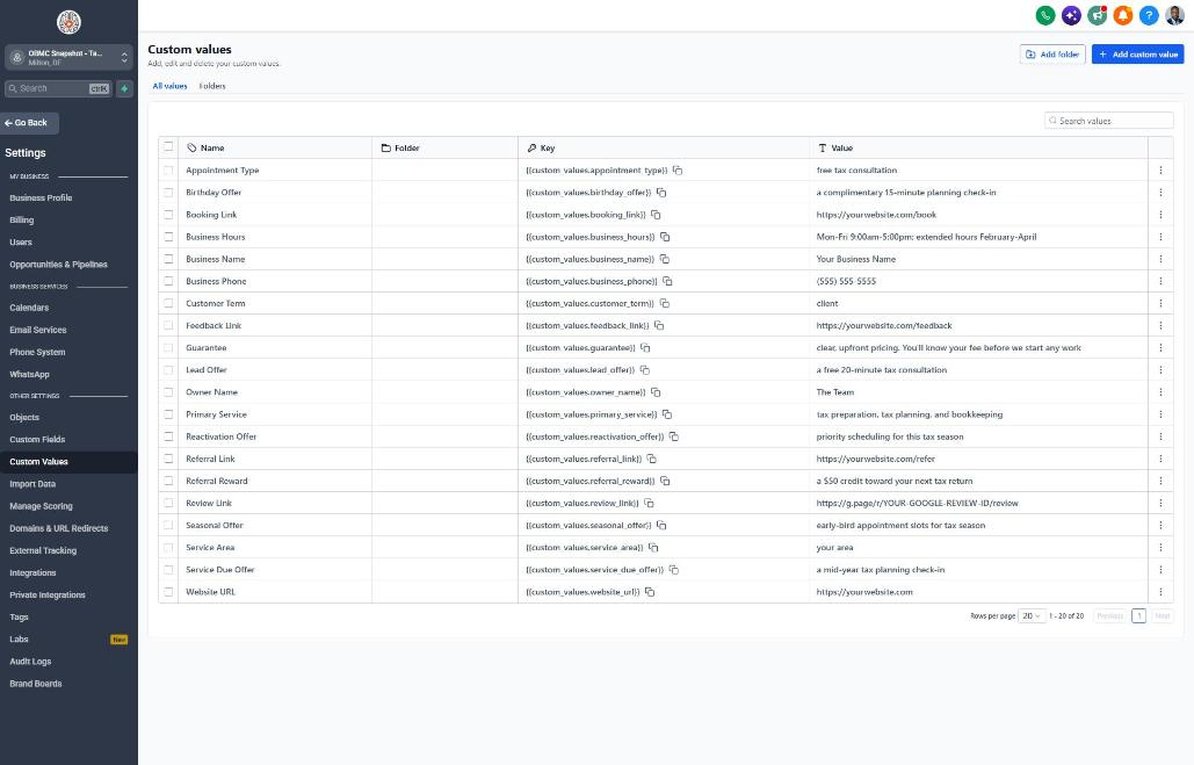
| Custom value | Tax & Accounting default |
|---|---|
| Business Name | Your value |
| Business Phone | Your value |
| Owner Name | Your value |
| Website URL | Your value |
| Booking Link | Your value |
| Review Link | Your value |
| Feedback Link | Your value |
| Referral Link | Your value |
| Service Area | Your value |
| Customer Term | client |
| Appointment Type | free tax consultation |
| Primary Service | tax preparation, tax planning, and bookkeeping |
| Lead Offer | a free 20-minute tax consultation |
| Guarantee | clear, upfront pricing. You'll know your fee before we start any work |
| Referral Reward | a $50 credit toward your next tax return |
| Reactivation Offer | priority scheduling for this tax season |
| Seasonal Offer | early-bird appointment slots for tax season |
| Service Due Offer | a mid-year tax planning check-in |
| Birthday Offer | a complimentary 15-minute planning check-in |
| Business Hours | Mon-Fri 9:00am-5:00pm; extended hours February-April |
KPIs to track every week
| Metric | Goal | Where in GoHighLevel |
|---|---|---|
| Speed to first contact | Reply to every new inquiry in under 5 minutes during business hours, even in peak season | Conversations and contact timelines in Contacts |
| Consultation-to-engagement rate | Grow the share of consultations that sign an engagement letter each season | Opportunities > Pipelines (Consultation Completed vs. Engaged Client) |
| Days to complete documents | Shorten the average time from Documents Requested to Documents Status = Complete | Contacts > Smart Lists filtered by Documents Status |
| Returning client rebook rate | Rebook most of last year's clients before February with workflows 14 and 20 | Calendars > Appointments and Contacts tagged 'returning-client' |
| Off-season engagements | Book planning check-ins and bookkeeping engagements every month from May to December | Workflow 19 stats in Automation > Workflows and Opportunities |
| New Google reviews | Earn new reviews each week of filing season | Reputation > Overview |
Campaign ideas for your client
- Early-bird tax season appointments for returning clients
- Free mid-year tax planning check-in for individuals and business owners
- Bookkeeping cleanup package for businesses with messy books before tax season
- S-Corp election review for growing sole proprietors and LLCs
- IRS notice review for people who received a letter and don't know what it means
Compliance notes
- IRC Section 7216 restricts using or disclosing tax return information for marketing (including cross-selling bookkeeping or planning) without the client's written consent. Segment campaigns using consented data only.
- The FTC Safeguards Rule requires tax preparers to protect client information. Never request SSNs, bank details, or tax documents by SMS or email; route clients to a secure portal.
- Treasury Circular 230 and state board rules prohibit false or misleading advertising. Don't promise refund amounts, 'maximum refunds', or results.
- Register A2P 10DLC and capture express written consent for texts. Brand messages clearly with your firm name so clients don't mistake them for IRS impersonation scams.
- Remind clients that the IRS does not initiate contact by text or social media, and give them a firm phone number to verify any suspicious message.
This is general guidance, not legal advice. Confirm the rules for your client's state and industry.