
Med Spa snapshot setup guide
Install, brand and launch the snapshot in about an hour. Follow the steps in order.
Setup checklist
Load the snapshot
In Agency view, go to Account Snapshots > Imported Snapshots and load the Med Spa snapshot into a new or existing sub-account. If your plan offers HIPAA features, enable them on the sub-account before importing any patients.
Fill in the business profile
Go to Settings > Business Profile and enter the practice name, address, phone, website and time zone. Messages send based on this time zone.
Set your custom values
Go to Settings > Custom Values and fill in Business Name, Owner Name, Business Phone, Service Area and the four links. Adjust the offers to match the practice's pricing, and have the medical director approve any offer wording.
Connect a phone number and register A2P
Go to Settings > Phone Numbers, buy or port a number, and complete A2P 10DLC registration in the Trust Center tab with the practice's legal name and EIN. Describe the campaign as appointment reminders, consultation follow-up and promotions.
Connect email sending
Go to Settings > Email Services and add a dedicated sending domain, then add and verify the DNS records. This keeps confirmations and offers out of spam.
Configure the consultation calendar
Go to Calendars > Calendar Settings and open "Complimentary Consultation." Assign providers, set availability and buffers, and add your cancellation policy to the calendar description. Copy the booking link into the Booking Link custom value.
Review the pipelines
Go to Opportunities > Pipelines and confirm the Consult Booked, Consult Completed and Treatment Plan Sent stages. Use opportunity values for plan totals, and never type clinical notes into opportunity names.
Connect Google reviews
Go to Settings > Integrations and connect Google Business Profile, then copy the review link from Reputation > Settings into the Review Link custom value. When responding to reviews, never confirm someone is a patient or mention treatments.
Customize and embed the consultation form
Go to Sites > Forms > Builder and open "01 · Request a Quote / Booking Request." Keep it to contact and scheduling questions only, add a consent-to-text checkbox, and embed it on the website.
Import patients and lock down access
Import only patients who agreed to receive texts in Contacts > Import, mapping Last Treatment Date, Rebooking Interval and Membership Status. In Settings > My Staff, limit contact access to staff who need it.
Publish the workflows
Go to Automation > Workflows, review the copy with the practice and publish. Start with 01, 02, 04, 05 and 11, then 19. Trigger Workflow 21 by tagging returning patients 'niche campaign'.
Go live test
Submit the consultation form with your own details, call the practice line and let it ring out, and book a test consultation. Confirm the texts, emails and team alerts arrive and that none include clinical details, then delete the test contact.
Custom values: fill these once
All 21 workflows pull from these values, so your client's name, links and offers show up everywhere. Pre-filled med spa defaults are shown; replace the business details.
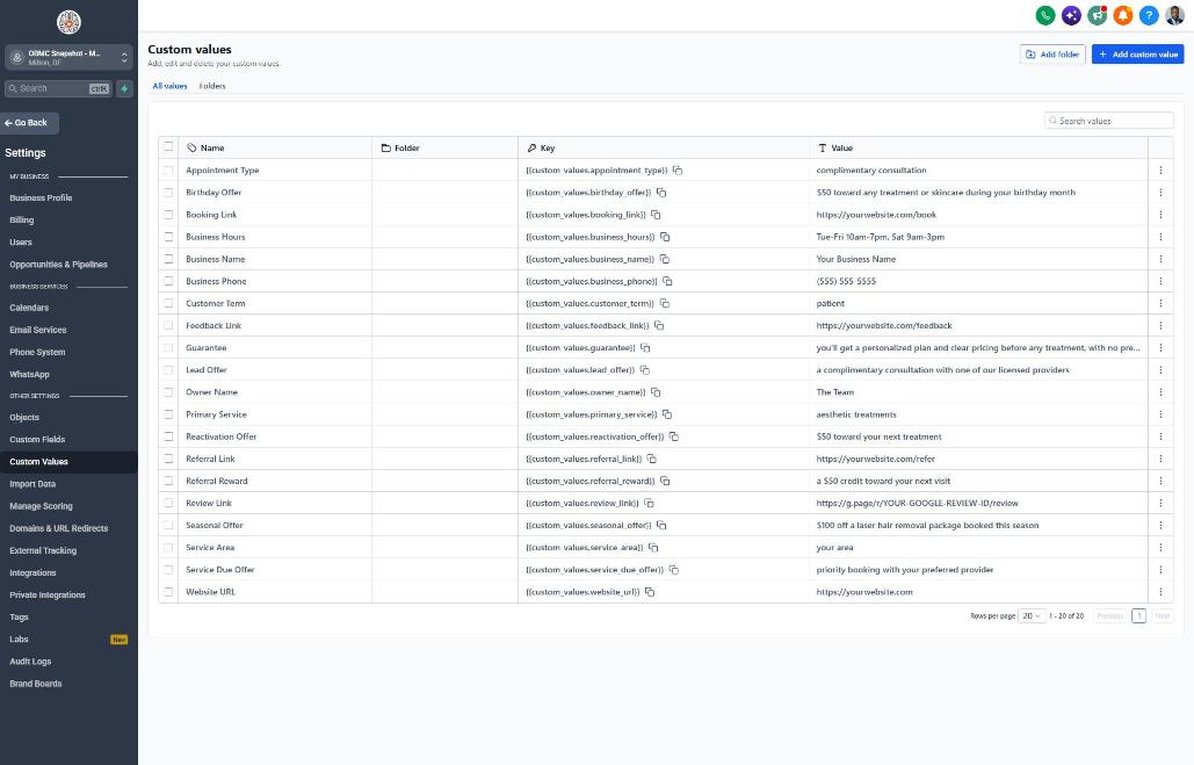
| Custom value | Med Spa default |
|---|---|
| Business Name | Your value |
| Business Phone | Your value |
| Owner Name | Your value |
| Website URL | Your value |
| Booking Link | Your value |
| Review Link | Your value |
| Feedback Link | Your value |
| Referral Link | Your value |
| Service Area | Your value |
| Customer Term | patient |
| Appointment Type | complimentary consultation |
| Primary Service | aesthetic treatments |
| Lead Offer | a complimentary consultation with one of our licensed providers |
| Guarantee | you'll get a personalized plan and clear pricing before any treatment, with no pressure to book |
| Referral Reward | a $50 credit toward your next visit |
| Reactivation Offer | $50 toward your next treatment |
| Seasonal Offer | $100 off a laser hair removal package booked this season |
| Service Due Offer | priority booking with your preferred provider |
| Birthday Offer | $50 toward any treatment or skincare during your birthday month |
| Business Hours | Tue-Fri 10am-7pm, Sat 9am-3pm |
KPIs to track every week
| Metric | Goal | Where in GoHighLevel |
|---|---|---|
| Speed to lead | Aim to respond to every consultation inquiry within 5 minutes during business hours | Conversations and contact activity |
| Consult show rate | Aim to improve show rates month over month with reminders | Calendars > appointment list and Workflow 05 stats |
| Consult-to-treatment conversion | Track monthly and aim to improve it each quarter | Opportunities > Sales Pipeline, Consult Completed to Won |
| On-time rebooking | Aim to rebook most patients within their recommended interval | Automation > Workflows > 19 stats and Contacts filtered by Next Service Due |
| Active members | Grow active memberships every month | Contacts filtered by Membership Status = Active member |
| Google reviews | Aim for steady new reviews each week | Reputation > Overview |
Campaign ideas for your client
- Complimentary consultation with a licensed provider for new patients
- Membership with a monthly treatment credit, member pricing and priority booking
- Laser hair removal package savings when booked in fall or winter
- Skincare bundle credit with any treatment series
- Bring-a-friend consultation event (check state rules on referral incentives first)
Compliance notes
- HIPAA: ask whether your GHL plan offers HIPAA features and a Business Associate Agreement, and enable them before storing patient information. Keep clinical notes, health history and treatment details out of GHL fields, SMS and email.
- Never ask for or discuss medical details by text. Keep reminders generic ('your next visit') and move medical questions to a phone call or secure patient portal.
- Before-and-after photos and testimonials need the patient's separate written authorization for marketing use, and must reflect typical experiences under FTC rules. Track permission in the Photo Consent on File field.
- Avoid outcome claims ('erase wrinkles', 'permanent results') and follow your state medical board's advertising and supervision rules. Some states restrict referral rewards and discounts tied to medical services, so review W12 and W17 offers locally.
- Register A2P 10DLC and get prior express written consent before sending marketing texts under the TCPA. Honor STOP replies immediately.
This is general guidance, not legal advice. Confirm the rules for your client's state and industry.