
PI Law snapshot setup guide
Install, brand and launch the snapshot in about an hour. Follow the steps in order.
Setup checklist
Load the snapshot
In Agency view, go to Account Snapshots, find the OBMC PI Law snapshot, and click Load into the firm's sub-account. Import all assets, then switch into the sub-account.
Fill in the business profile
Go to Settings > Business Profile and enter the firm name, office address, main phone, website, and time zone. Use the responsible attorney's name where your state requires it on advertising.
Update custom values
Go to Settings > Custom Values and update Business Name, Owner Name, Business Phone, Booking Link, Review Link, Feedback Link, and Referral Link. Edit the Guarantee value so it matches the firm's actual fee agreement language exactly.
Connect a phone number and register A2P
Go to Settings > Phone Numbers to buy or port the intake number, then complete A2P 10DLC registration in Settings > Phone Numbers > Trust Center. Forward calls to intake or your answering service so missed-call text-back covers after-hours calls.
Set up email sending
Go to Settings > Email Services and connect a dedicated sending domain such as mail.yourfirm.com. Add the DNS records, verify, and set the from name to the firm.
Configure the case review calendar
Go to Calendars > Calendar Settings, open Free Case Review, assign intake staff and attorneys, and set hours, including evenings if offered. Copy the calendar link into the Booking Link custom value.
Customize the case review form
Go to Sites > Forms > Builder and open the Request a Quote form, renamed Free Case Review. Confirm Case Type, Date of Incident, and Already Represented fields, add consent and 'no attorney-client relationship' language, then embed it on the website.
Review the pipelines
Go to Opportunities > Pipelines and review the intake, case journey, and reactivation pipelines. Match stage names to how intake talks about cases, such as Case Review Booked and Fee Agreement Sent.
Connect reviews
Go to Reputation > Settings and connect the firm's Google Business Profile. Paste the Google review link into the Review Link custom value so workflow 11 routes happy clients correctly.
Assign intake notifications
Go to Settings > My Staff and add intake, paralegals, and attorneys. In Automation > Workflows, set notification recipients in workflows 03, 11, 13, and 18, and assign workflow 21 tasks to the case manager.
Compliance review of all copy
Export or screenshot every message in Automation > Workflows and have the responsible attorney review it against your state's advertising rules. Add 'Attorney Advertising' labels or other required disclaimers where needed before publishing.
Go live test
Publish all workflows in Automation > Workflows. Submit the case review form with your own contact details, call the intake number and hang up, book a test review, and move a test opportunity to Signed Client to confirm the document collection sequence runs.
Custom values: fill these once
All 21 workflows pull from these values, so your client's name, links and offers show up everywhere. Pre-filled pi law defaults are shown; replace the business details.
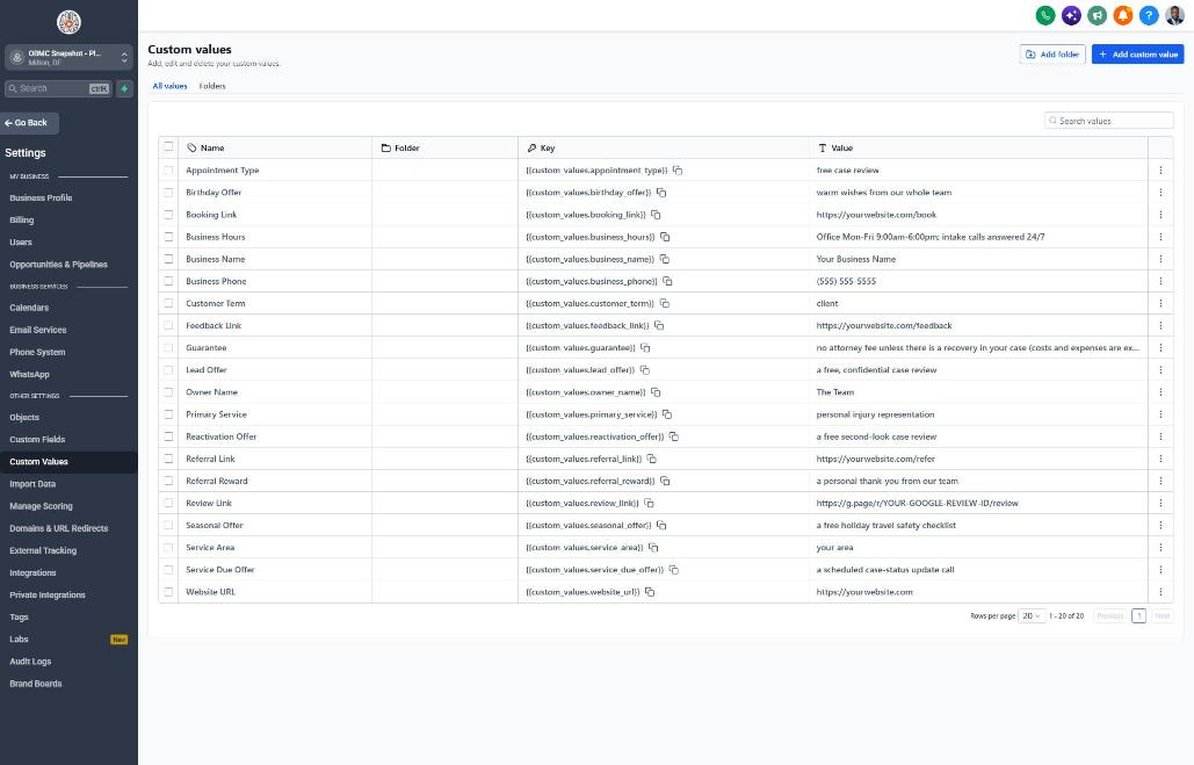
| Custom value | PI Law default |
|---|---|
| Business Name | Your value |
| Business Phone | Your value |
| Owner Name | Your value |
| Website URL | Your value |
| Booking Link | Your value |
| Review Link | Your value |
| Feedback Link | Your value |
| Referral Link | Your value |
| Service Area | Your value |
| Customer Term | client |
| Appointment Type | free case review |
| Primary Service | personal injury representation |
| Lead Offer | a free, confidential case review |
| Guarantee | no attorney fee unless there is a recovery in your case (costs and expenses are explained in our fee agreement) |
| Referral Reward | a personal thank-you from our team |
| Reactivation Offer | a free second-look case review |
| Seasonal Offer | a free holiday travel safety checklist |
| Service Due Offer | a scheduled case-status update call |
| Birthday Offer | warm wishes from our whole team |
| Business Hours | Office Mon-Fri 9:00am-6:00pm; intake calls answered 24/7 |
KPIs to track every week
| Metric | Goal | Where in GoHighLevel |
|---|---|---|
| Time to first contact | Every new inquiry contacted in under 5 minutes, including nights and weekends | Conversations and Contacts > contact timeline |
| Inquiry-to-case-review rate | Grow the share of qualified inquiries that book a free case review each month | Opportunities > Pipelines (Case Review Booked stage) |
| Case review show rate | Steadily reduce no-shows with reminders and phone-review options | Calendars > Appointments (showed vs. no-show) |
| Agreement signing rate | Improve the share of sent fee agreements that are signed quarter over quarter | Opportunities > Pipelines (Fee Agreement Sent vs. Signed Client) |
| Days to complete documents | Shorten the time from signing to 'All requested' documents received | Contacts > Smart Lists filtered by Documents Received |
| Client reviews | Earn new Google reviews each month from clients with resolved cases | Reputation > Overview |
Campaign ideas for your client
- Free, confidential case review by phone, video, or in person
- Evening and weekend case reviews for people who can't take time off work
- Free second-look review for people who started handling their claim alone
- Holiday and summer travel safety checklist for past clients and the community
- Free accident-scene checklist card for the glovebox (an educational resource, not a solicitation)
Compliance notes
- Attorney advertising rules vary by state. Avoid outcome promises, past-result claims without required disclaimers, and 'expert' or 'specialist' language unless certified, and add 'Attorney Advertising' labels where your state requires them.
- Lawyers generally cannot pay or give anything of value for referrals (ABA Model Rule 7.2). Keep referral messages to thanks only, with no gift cards or rewards.
- Only text and email people who contacted the firm or gave express written consent. Some states restrict direct contact with accident victims for a period after the incident, so never upload purchased accident lists.
- Never request medical details, diagnoses, or records by SMS or standard email. Collect health information by phone or through a secure client portal, and protect it as confidential client information.
- Include language that a form submission or message does not create an attorney-client relationship and is not legal advice. Register A2P 10DLC with an accurate legal-services use case.
This is general guidance, not legal advice. Confirm the rules for your client's state and industry.