
Landscaping snapshot setup guide
Install, brand and launch the snapshot in about an hour. Follow the steps in order.
Setup checklist
Load the snapshot
In Agency view, go to Account Snapshots > Imported Snapshots and load the Landscaping snapshot into a new or existing sub-account. Choose to overwrite only if the sub-account is empty. Switch into the sub-account when it finishes.
Fill in the business profile
Go to Settings > Business Profile and enter the company name, address, phone, website and time zone. The time zone controls when texts send, so double-check it.
Set your custom values
Go to Settings > Custom Values and fill in Business Name, Owner Name, Business Phone, Service Area, Booking Link, Review Link, Feedback Link and Referral Link. Then adjust the offers (Lead Offer, Seasonal Offer, Reactivation Offer and others) to match what the company actually runs this season.
Connect a phone number and register A2P
Go to Settings > Phone Numbers, buy or port a local number, then complete A2P 10DLC registration under the Trust Center tab. Use the company's legal name and EIN exactly as registered with the IRS. Texts will not deliver reliably until the campaign is approved.
Connect email sending
Go to Settings > Email Services and add a dedicated sending domain (for example mail.companyname.com). Add the DNS records it gives you and verify. This keeps estimate follow-ups out of spam.
Configure the estimate calendar
Go to Calendars > Calendar Settings and open "Free On-Site Estimate." Assign the estimator, set availability to the hours they actually do walk-throughs, add a 30-minute buffer for drive time and copy the booking link into the Booking Link custom value.
Review the pipelines
Go to Opportunities > Pipelines and confirm the Sales Pipeline stages read Estimate Visit Booked, Property Walked and Estimate Sent. Add an opportunity value for typical mowing contracts so pipeline totals mean something.
Connect Google reviews
Go to Settings > Integrations and connect the Google Business Profile, then open Reputation > Settings and copy the review link into the Review Link custom value. Workflow 11 uses it to send 4-5 star customers straight to Google.
Customize and embed the quote form
Go to Sites > Forms > Builder and open "01 · Request a Quote / Booking Request." Confirm Property Address, Property Size and Service Frequency are on the form, then copy the embed code onto the website's contact and service pages.
Import past customers
Go to Contacts > Import and upload last season's customer list with consent to text. Map Last Service Date and Next Service Due, and tag contacts 'customer'. Do not tag them for campaigns yet.
Publish the workflows
Go to Automation > Workflows, open each workflow, review the copy and toggle it from Draft to Publish. Start with 01, 02, 04, 05 and 11, then publish the rest. Leave 14, 20 and 21 published but only trigger them by adding their tags.
Go live test
Submit the quote form with your own phone and email, call the business number and let it ring out, and book a test estimate. Confirm you receive the instant text, missed-call text, booking confirmation and team alerts, then delete the test contact.
Custom values: fill these once
All 21 workflows pull from these values, so your client's name, links and offers show up everywhere. Pre-filled landscaping defaults are shown; replace the business details.
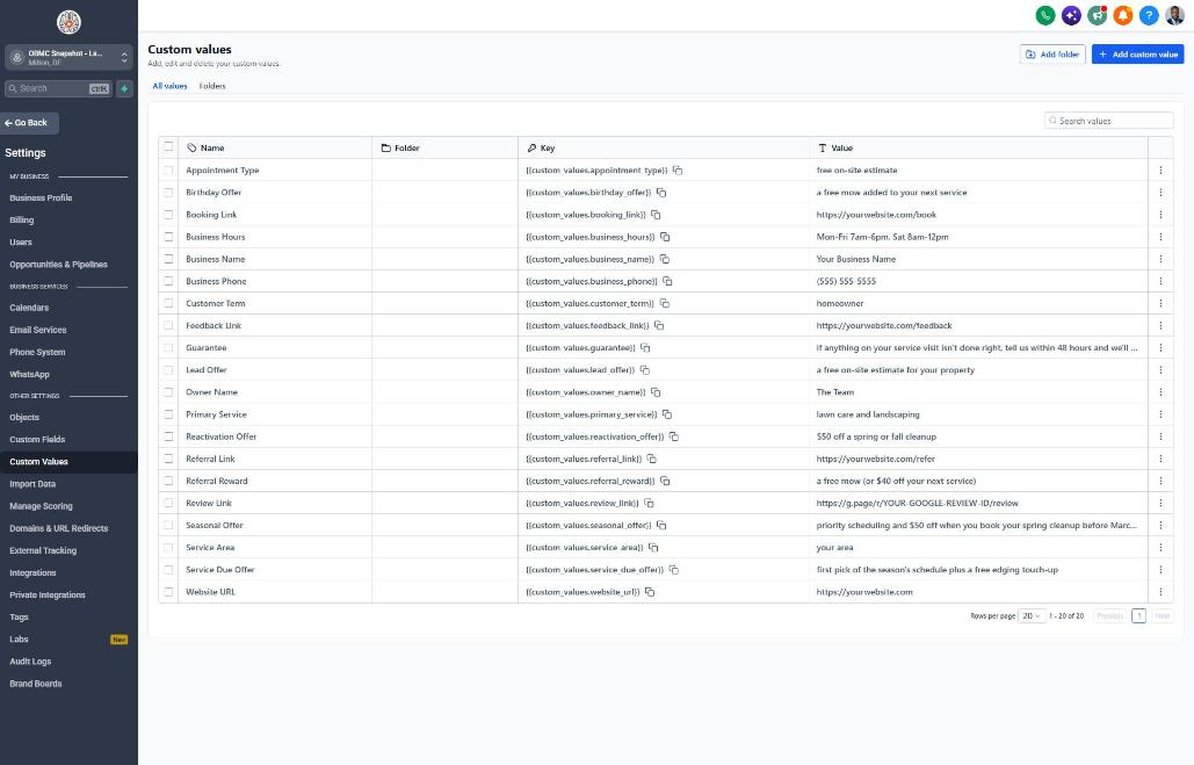
| Custom value | Landscaping default |
|---|---|
| Business Name | Your value |
| Business Phone | Your value |
| Owner Name | Your value |
| Website URL | Your value |
| Booking Link | Your value |
| Review Link | Your value |
| Feedback Link | Your value |
| Referral Link | Your value |
| Service Area | Your value |
| Customer Term | homeowner |
| Appointment Type | free on-site estimate |
| Primary Service | lawn care and landscaping |
| Lead Offer | a free on-site estimate for your property |
| Guarantee | if anything on your service visit isn't done right, tell us within 48 hours and we'll come back and fix it at no charge |
| Referral Reward | a free mow (or $40 off your next service) |
| Reactivation Offer | $50 off a spring or fall cleanup |
| Seasonal Offer | priority scheduling and $50 off when you book your spring cleanup before March 31 |
| Service Due Offer | first pick of the season's schedule plus a free edging touch-up |
| Birthday Offer | a free mow added to your next service |
| Business Hours | Mon-Fri 7am-6pm, Sat 8am-12pm |
KPIs to track every week
| Metric | Goal | Where in GoHighLevel |
|---|---|---|
| Speed to lead | Aim to reach every new estimate request within 5 minutes during business hours | Conversations and the contact's activity timeline |
| Estimate booking rate | Aim to book a property walk for at least half of qualified leads | Opportunities > Sales Pipeline, New Lead to Estimate Visit Booked |
| Estimate close rate | Track monthly and aim to improve it every quarter | Opportunities > Sales Pipeline, Estimate Sent to Won |
| Recurring accounts | Grow the number of weekly/bi-weekly and annual plan customers every season | Contacts, filtered by Contract Type |
| Google reviews | Aim for new reviews every week during peak season | Reputation > Overview |
| Reactivation replies | Get a reply from a meaningful share of last season's list before routes are set | Opportunities > Reactivation pipeline |
Campaign ideas for your client
- Early-bird spring cleanup: book before March 31 and get priority scheduling plus a discount
- Annual care plan: weekly mowing plus spring and fall cleanups on one monthly price
- Neighbor bundle: two neighbors who sign up for weekly mowing both get a free mow
- Fall aeration and overseeding package added to any active mowing account
- Free design consultation credited toward any patio or planting project over a set amount
Compliance notes
- Register A2P 10DLC before sending any texts. Carriers filter unregistered business SMS, and your campaign description should mention estimate follow-up, service reminders and promotions.
- Only text past customers who gave consent to receive texts. Under the TCPA, marketing texts like the Seasonal Promo and Annual Care Plan campaigns need prior express written consent.
- Respect quiet hours: keep campaign sends between 8am and 8pm in the homeowner's local time, and check your state's rules, since some states set stricter hours and frequency limits.
- Honor STOP replies immediately. GHL handles this automatically, but don't re-add opted-out contacts from a fresh import.
- Don't promise specific results like weed-free lawns or guaranteed growth. Describe the work you'll do, not outcomes you can't control.
This is general guidance, not legal advice. Confirm the rules for your client's state and industry.