
Insurance snapshot setup guide
Install, brand and launch the snapshot in about an hour. Follow the steps in order.
Setup checklist
Load the snapshot
In Agency view, go to Account Snapshots, find the OBMC Insurance snapshot, and click Load to load it into a new or existing sub-account. Choose to import all assets. Then switch into that sub-account.
Fill in the business profile
Go to Settings > Business Profile and enter the agency's legal name, address, phone, website, and time zone. The time zone controls when texts and reminders send, so double-check it.
Update custom values
Go to Settings > Custom Values and update Business Name, Owner Name, Business Phone, Booking Link, Review Link, Feedback Link, and Referral Link. Review the pre-filled offers and confirm the referral reward complies with your state's anti-rebating rules.
Connect a phone number and register A2P
Go to Settings > Phone Numbers to buy or port a number, then complete A2P 10DLC brand and campaign registration in Settings > Phone Numbers > Trust Center. Turn on call forwarding to the agency's main line so missed-call text-back works.
Set up email sending
Go to Settings > Email Services and connect a dedicated sending domain (for example mail.youragency.com). Add the DNS records shown, verify, and set the default from name to the agency or lead producer.
Configure the coverage review calendar
Go to Calendars > Calendar Settings, open Free Coverage Review, assign producers, and set availability, duration, and buffers. Copy the calendar link into the Booking Link custom value.
Customize the quote request form
Go to Sites > Forms > Builder and open Request a Quote. Confirm Lines of Interest, Current Carrier, and Policy Renewal Date are included, update the consent checkbox wording, and embed the form on the website's quote page.
Review the pipelines
Go to Opportunities > Pipelines and review the Sales, Customer Journey, and Reactivation pipelines. Rename stages to match how the agency talks about quotes and binding if needed.
Connect reviews
Go to Reputation > Settings and connect the agency's Google Business Profile. Copy the Google review link into the Review Link custom value so workflow 11 sends happy clients to the right page.
Assign team notifications
Go to Settings > My Staff and add each producer and CSR. In Automation > Workflows, open workflows 03, 11, 13, and 18 and set the internal notification steps to the correct users.
Import the book and set renewal dates
Go to Contacts > Import and upload a CSV export from your AMS with name, phone, email, Policy Renewal Date, and Policies In Force. Only import contacts with valid consent to receive texts and emails, and tag them by line of business.
Go live test
In Automation > Workflows, publish all 21 workflows. Submit the quote form with your own phone and email, call the number and hang up, and book a test review to confirm texts, emails, reminders, and pipeline moves work end to end.
Custom values: fill these once
All 21 workflows pull from these values, so your client's name, links and offers show up everywhere. Pre-filled insurance defaults are shown; replace the business details.
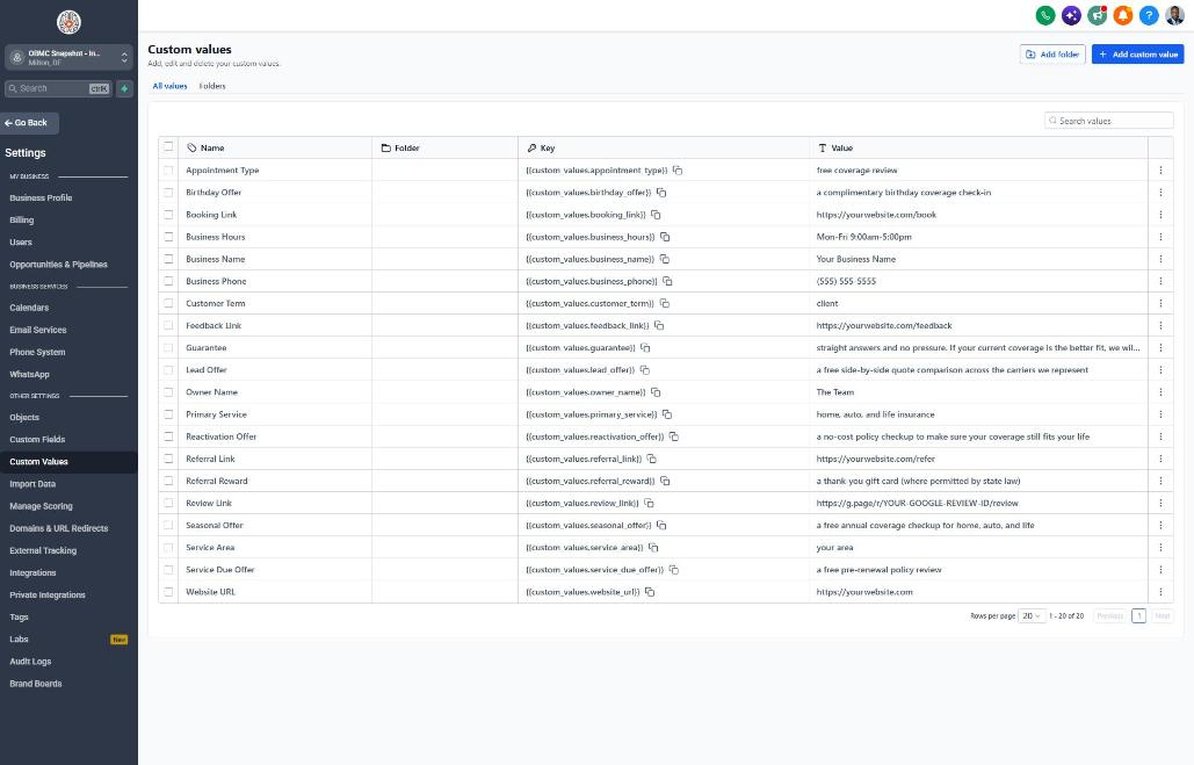
| Custom value | Insurance default |
|---|---|
| Business Name | Your value |
| Business Phone | Your value |
| Owner Name | Your value |
| Website URL | Your value |
| Booking Link | Your value |
| Review Link | Your value |
| Feedback Link | Your value |
| Referral Link | Your value |
| Service Area | Your value |
| Customer Term | client |
| Appointment Type | free coverage review |
| Primary Service | home, auto, and life insurance |
| Lead Offer | a free side-by-side quote comparison across the carriers we represent |
| Guarantee | straight answers and no pressure. If your current coverage is the better fit, we will tell you |
| Referral Reward | a thank-you gift card (where permitted by state law) |
| Reactivation Offer | a no-cost policy checkup to make sure your coverage still fits your life |
| Seasonal Offer | a free annual coverage checkup for home, auto, and life |
| Service Due Offer | a free pre-renewal policy review |
| Birthday Offer | a complimentary birthday coverage check-in |
| Business Hours | Mon-Fri 9:00am-5:00pm |
KPIs to track every week
| Metric | Goal | Where in GoHighLevel |
|---|---|---|
| Speed to first contact | Every new quote request contacted in under 5 minutes during business hours | Conversations and Contacts > contact timeline |
| Quote-to-review booking rate | Steadily increase the share of quote requests that book a coverage review month over month | Opportunities > Pipelines (Sales Pipeline, Review Booked stage) |
| Quote-to-bind rate | Track bound policies against quotes sent and aim to improve it every quarter | Opportunities > Pipelines (Quote Sent vs. Policy Bound) and Reporting |
| Policies per household | Increase the number of clients with 2+ lines each quarter through workflow 21 | Contacts > Smart Lists filtered by Policies In Force |
| Pre-renewal reviews booked | Book a review with a meaningful share of clients reaching renewal each month | Calendars > Appointments and workflow 19 stats in Automation > Workflows |
| New Google reviews | Earn new Google reviews every month from newly bound clients | Reputation > Overview |
Campaign ideas for your client
- Free side-by-side quote comparison across the carriers you represent
- No-cost pre-renewal coverage review 30-45 days before every renewal
- Home + auto bundle review for single-line clients
- New homeowner coverage check for recent home buyers
- Life insurance needs review during Life Insurance Awareness Month in September
Compliance notes
- Never promise savings or specific rates. Use phrasing like 'compare options' and 'discounts may be available where eligible'; final pricing depends on underwriting.
- Referral rewards can violate anti-rebating and inducement laws in some states. Confirm what is permitted with your state insurance department before offering gift cards or cash.
- A2P 10DLC registration and documented express written consent are required before texting. Keep TCPA-compliant consent language on every form and honor STOP replies immediately.
- Do not collect driver's license numbers, SSNs, or bank details by SMS or email. Gather them by phone or through your carrier's or AMS's secure portal.
- Make sure all producers who are named or who respond to leads hold active licenses in the prospect's state, and include licensing information on landing pages as required.
This is general guidance, not legal advice. Confirm the rules for your client's state and industry.