
Fitness snapshot setup guide
Install, brand and launch the snapshot in about an hour. Follow the steps in order.
Setup checklist
Load the snapshot
Open the snapshot share link while logged in to your agency to import it. Go to Account Snapshots > Imported Snapshots, open the actions menu on the Fitness snapshot and choose Push to Sub-Account, or select it when creating a new sub-account under Sub-Accounts > Create Sub-Account.
Complete the business profile
In the gym's sub-account, go to Settings > Business Profile. Add the gym name, address, phone, logo and time zone so reminders go out at the right local time.
Fill in custom values
Go to Settings > Custom Values and update the business name, owner name, phone and service area. Confirm the trial offer, comeback offer, referral reward and seasonal offer with the owner before launch.
Connect the phone number and register A2P
Go to Settings > Phone Numbers to buy or port a number, then complete A2P 10DLC registration in the Trust Center. Use a marketing plus customer care use case with sample messages from this snapshot.
Set up email sending
Go to Settings > Email Services and add a dedicated sending domain like mail.gymname.com. Verify the DNS records so welcome and reminder emails reach the inbox.
Configure the Free Intro Session calendar
Go to Calendars > Calendar Settings, edit Free Intro Session, assign coaches and set availability around your class schedule. Copy the booking link into the booking_link custom value.
Customize and embed the forms
Go to Sites > Forms > Builder. Review the trial request form, adjust the service list for the gym's programs, and connect it to the website and your Facebook or Instagram lead ads.
Review the pipelines
Go to Opportunities > Pipelines and walk through Intro Session Booked, Trial Active and Membership Offer Sent. Show staff how to move a card to Won when someone joins and to Lost when a trial ends without a join.
Connect Google reviews
Go to Settings > Integrations and connect the gym's Google Business Profile. Confirm the review link under Reputation > Settings and paste it into the review_link custom value.
Set up trial and retention tagging
Decide how trial starts get the 'niche campaign' tag (front desk at the intro session, or Zapier from your gym software). Do the same for 'service due' every 90 days and 'start reactivation' for cancelled members.
Assign alerts and publish workflows
Go to Automation > Workflows, open each workflow, set team alerts to the manager on duty, confirm the From name and publish. Leave workflow 20 in draft until the New Year campaign window.
Go live test
Submit the trial form as a test contact, call the gym number and let it ring out, then book a test intro session. Check Conversations to confirm every text and email arrived and staff got the alerts, then delete the test contact.
Custom values: fill these once
All 21 workflows pull from these values, so your client's name, links and offers show up everywhere. Pre-filled fitness defaults are shown; replace the business details.
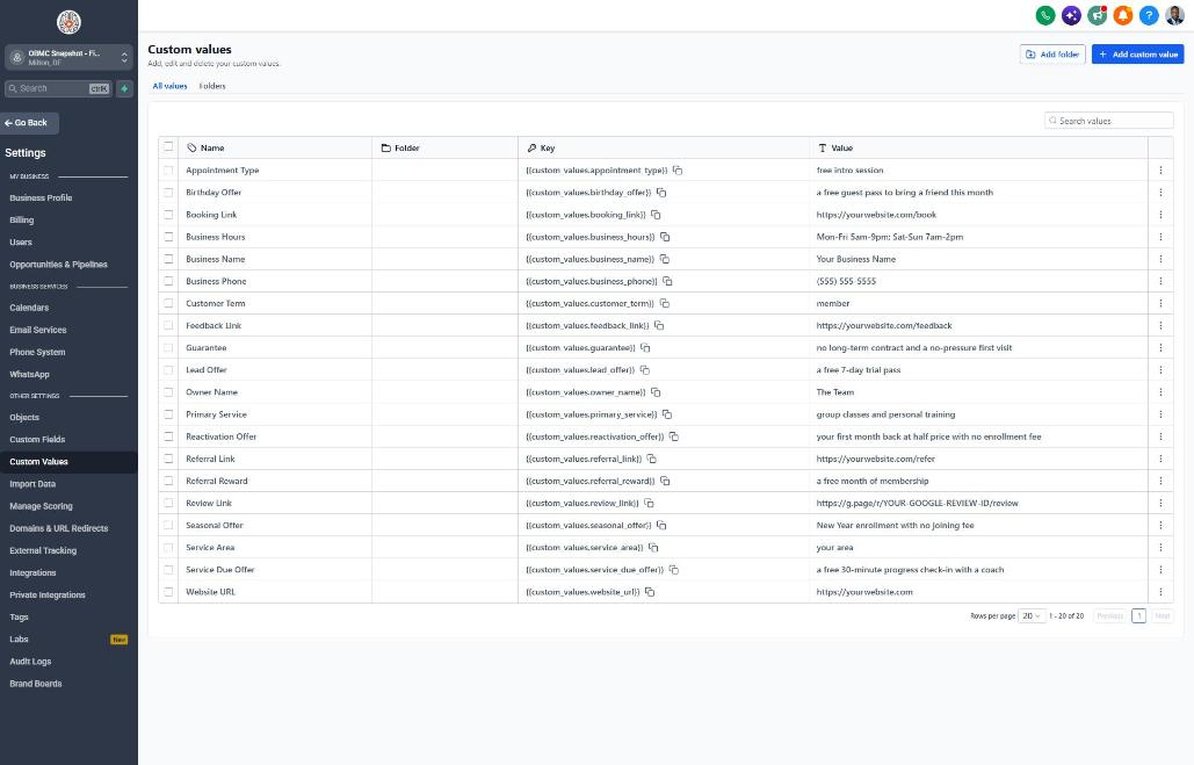
| Custom value | Fitness default |
|---|---|
| Business Name | Your value |
| Business Phone | Your value |
| Owner Name | Your value |
| Website URL | Your value |
| Booking Link | Your value |
| Review Link | Your value |
| Feedback Link | Your value |
| Referral Link | Your value |
| Service Area | Your value |
| Customer Term | member |
| Appointment Type | free intro session |
| Primary Service | group classes and personal training |
| Lead Offer | a free 7-day trial pass |
| Guarantee | no long-term contract and a no-pressure first visit |
| Referral Reward | a free month of membership |
| Reactivation Offer | your first month back at half price with no enrollment fee |
| Seasonal Offer | New Year enrollment with no joining fee |
| Service Due Offer | a free 30-minute progress check-in with a coach |
| Birthday Offer | a free guest pass to bring a friend this month |
| Business Hours | Mon-Fri 5am-9pm; Sat-Sun 7am-2pm |
KPIs to track every week
| Metric | Goal | Where in GoHighLevel |
|---|---|---|
| Speed to lead | Reply to every new trial lead within 5 minutes during staffed hours | Conversations and opportunity timelines in the Sales Pipeline |
| Intro session show rate | Aim for 75% or more of booked intro sessions showing up | Reporting > Appointment Report and Calendars > Appointments |
| Trial-to-member conversion | Track the share of Trial Active cards that reach Won and improve it every month | Opportunities > Pipelines, Trial Active vs Won |
| New members per month | Hit the gym's monthly new-member goal set at kickoff | Dashboard won-opportunity widget |
| Former-member win-backs | Bring back a steady number of former members from every reactivation send | Reactivation pipeline, Booked stage |
| New Google reviews | Earn several new 5-star reviews every month | Reputation > Overview |
Campaign ideas for your client
- Free 7-day trial pass with a booked intro session
- Paid 14-day or 21-day intro challenge that rolls into membership
- Bring-a-friend week where members invite guests for free
- Former-member comeback month at a reduced rate with no enrollment fee
- New Year or back-to-routine enrollment with the joining fee waived
Compliance notes
- TCPA and A2P 10DLC: only text people who opted in (form consent checkbox or texted you first), keep 'Reply STOP to opt out' on first messages, and finish A2P registration before sending.
- No results claims: avoid promising weight loss, body changes or specific results in texts, emails or ads. Talk about classes, coaching, community and routine instead.
- Membership terms: many states have health club laws covering contracts, cancellation rights and auto-renewal disclosures. Make sure the gym's offers and 'no contract' language match its actual membership agreement.
- Health information: don't collect or discuss injuries or medical conditions by text. If someone mentions one, have a coach follow up by phone or in person.
- Reviews: never offer free classes or discounts in exchange for a review; the referral reward is for referrals only.
This is general guidance, not legal advice. Confirm the rules for your client's state and industry.