
Wedding & Events snapshot setup guide
Install, brand and launch the snapshot in about an hour. Follow the steps in order.
Setup checklist
Load the snapshot
In Agency view, go to Account Snapshots, find the OBMC Wedding & Events snapshot, and click Load into the business's sub-account. Import all assets, then switch into the sub-account.
Fill in the business profile
Go to Settings > Business Profile and enter the business name, address, phone, website, and time zone. Venues should use the venue address so tour confirmations are accurate.
Update custom values
Go to Settings > Custom Values and update Business Name, Owner Name, Business Phone, Booking Link, Review Link, Feedback Link, and Referral Link. Set Appointment Type to 'venue tour' or 'consultation' to match the business.
Connect a phone number and register A2P
Go to Settings > Phone Numbers to buy or port a number, then complete A2P 10DLC registration in Settings > Phone Numbers > Trust Center. Forward calls to the owner's mobile so missed-call text-back covers event days.
Set up email sending
Go to Settings > Email Services and connect a dedicated sending domain. Add the DNS records, verify, and set the from name to the owner or sales manager so replies feel personal.
Configure the tour and consultation calendar
Go to Calendars > Calendar Settings, open Tour & Consultation, set availability around event days, add in-person and video options, and set buffers. Copy the calendar link into the Booking Link custom value.
Customize the inquiry form
Go to Sites > Forms > Builder and open the inquiry form. Confirm Event Date, Event Type, and Guest Count, add consent language, and embed the form on the website and Instagram link-in-bio.
Connect directory and social inquiries
Go to Settings > Integrations to connect Facebook and Instagram so DMs land in Conversations. Route The Knot and WeddingWire lead emails into GHL with an email parser or Zapier so they trigger workflow 01.
Review the pipelines and date holds
Go to Opportunities > Pipelines and review the booking, event journey, and reactivation pipelines. Train the team to fill in Date Hold Expires on the contact whenever a proposal includes a courtesy hold.
Connect reviews and payments
Go to Reputation > Settings to connect Google Business Profile and paste the review link into Custom Values. Go to Payments > Integrations to connect Stripe so retainers and installments trigger workflows 15 and 16.
Import past couples and inquiries
Go to Contacts > Import and upload past couples with Event Date filled in, tagged 'past-couple', and old inquiries tagged 'reactivation'. Only import contacts who agreed to hear from you.
Go live test
Publish all workflows in Automation > Workflows. Submit the inquiry form with your own details, call the number and hang up, book a test tour, and set a test contact's Date Hold Expires to three days out to confirm workflow 21 fires.
Custom values: fill these once
All 21 workflows pull from these values, so your client's name, links and offers show up everywhere. Pre-filled wedding & events defaults are shown; replace the business details.
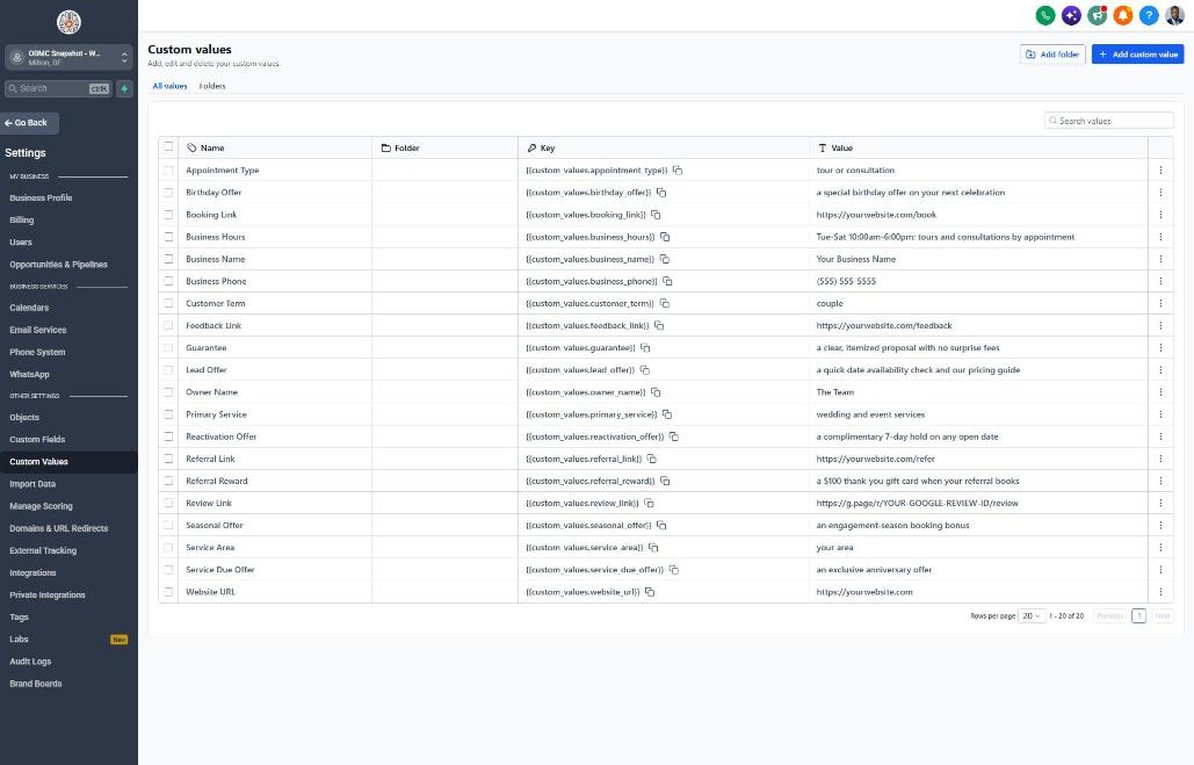
| Custom value | Wedding & Events default |
|---|---|
| Business Name | Your value |
| Business Phone | Your value |
| Owner Name | Your value |
| Website URL | Your value |
| Booking Link | Your value |
| Review Link | Your value |
| Feedback Link | Your value |
| Referral Link | Your value |
| Service Area | Your value |
| Customer Term | couple |
| Appointment Type | tour or consultation |
| Primary Service | wedding and event services |
| Lead Offer | a quick date availability check and our pricing guide |
| Guarantee | a clear, itemized proposal with no surprise fees |
| Referral Reward | a $100 thank-you gift card when your referral books |
| Reactivation Offer | a complimentary 7-day hold on any open date |
| Seasonal Offer | an engagement-season booking bonus |
| Service Due Offer | an exclusive anniversary offer |
| Birthday Offer | a special birthday offer on your next celebration |
| Business Hours | Tue-Sat 10:00am-6:00pm; tours and consultations by appointment |
KPIs to track every week
| Metric | Goal | Where in GoHighLevel |
|---|---|---|
| Inquiry response time | Reply to every new inquiry in under 5 minutes, including weekends | Conversations and contact timelines in Contacts |
| Inquiry-to-tour rate | Grow the share of inquiries that book a tour or consultation each month | Opportunities > Pipelines (Tour / Consult Booked stage) |
| Tour show rate | Keep no-shows low with reminders and video options | Calendars > Appointments (showed vs. no-show) |
| Proposal-to-booking rate | Improve the share of proposals that become signed contracts quarter over quarter | Opportunities > Pipelines (Proposal & Contract Sent vs. Booked) |
| Date hold conversion | Get a clear book, extend, or release decision on every courtesy hold before it expires | Contacts > Smart Lists filtered by Date Hold Expires and workflow 21 stats |
| Reviews and referrals | Request a review from every couple after their event and track new reviews and referrals monthly | Reputation > Overview and Opportunities filtered by referral source |
Campaign ideas for your client
- Complimentary 7-day date hold after a tour or consultation
- Engagement-season booking bonus from late December through February
- Off-peak and weekday date pricing for flexible couples
- Anniversary session, dinner, or vow renewal offer for past couples
- Preferred vendor referral partnership with a thank-you for each booked referral
Compliance notes
- Register A2P 10DLC and capture express written consent on your inquiry forms before texting. Directory leads may not include SMS consent, so start with email until the couple replies or opts in.
- Only reference date holds and deadlines that are real. Avoid fake scarcity such as 'only one Saturday left' unless it is true, to stay within FTC rules on deceptive marketing.
- Make sure contracts and proposals clearly state retainer, refund, and cancellation terms, and keep the message copy consistent with your actual policies.
- Get written permission before using couples' photos, names, or reviews in marketing, and never post fake or incentivized reviews. The FTC prohibits fake reviews and undisclosed incentives.
- Honor STOP requests immediately and respect quiet hours, especially when texting from event days or late at night.
This is general guidance, not legal advice. Confirm the rules for your client's state and industry.