
Coaching snapshot setup guide
Install, brand and launch the snapshot in about an hour. Follow the steps in order.
Setup checklist
Load the snapshot
In Agency view, go to Account Snapshots, find the OBMC Coaching snapshot, and click Load into the coach's sub-account. Import all assets, then switch into the sub-account.
Fill in the business profile
Go to Settings > Business Profile and enter the business name, website, phone, and time zone. Coaches with international clients should double-check the time zone, since reminders depend on it.
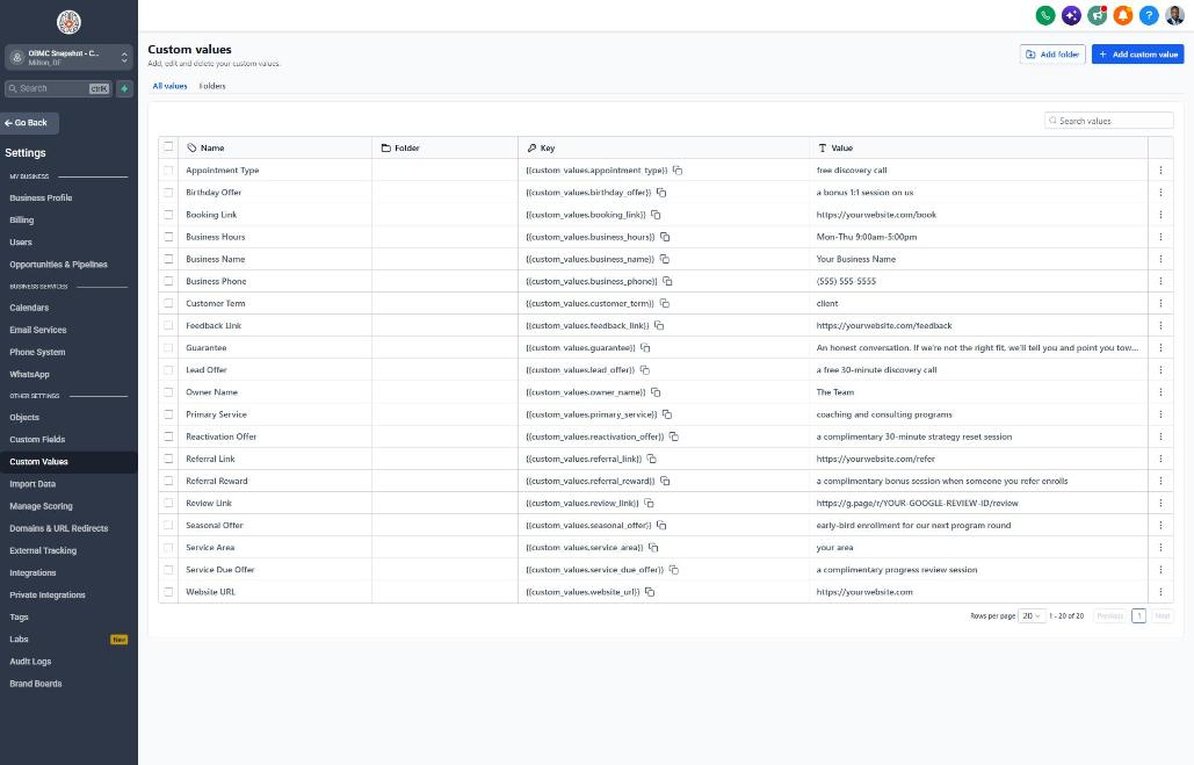
Update custom values
Go to Settings > Custom Values and update Business Name, Owner Name, Business Phone, Booking Link, Review Link, Feedback Link, and Referral Link. Rewrite the offer values in the coach's own words.
Connect a phone number and register A2P
Go to Settings > Phone Numbers to buy or port a number, then complete A2P 10DLC registration in Settings > Phone Numbers > Trust Center. Forward calls to the coach's mobile so missed-call text-back works during sessions.
Set up email sending
Go to Settings > Email Services and connect a dedicated sending domain. Add the DNS records, verify, and set the from name to the coach's first and last name so emails feel personal.
Configure the discovery call calendar
Go to Calendars > Calendar Settings, open Free Discovery Call, set availability, duration, buffers, and a Zoom or Google Meet location. Copy the calendar link into the Booking Link custom value.
Customize the lead and application forms
Go to Sites > Forms > Builder and open the booking request form. Confirm Program Interest, Biggest Challenge, and Timeline to Start, add consent language, and embed it on the website and link-in-bio page.
Connect webinar and challenge registrations
In Automation > Workflows, open workflow 21 and set the trigger to your webinar registration form or a 'webinar-registered' tag. Make sure attendance updates the Event Attendance field via tag or integration.
Review the pipelines
Go to Opportunities > Pipelines and review the enrollment, client journey, and reactivation pipelines. Rename stages if the coach uses applications or strategy sessions.
Connect reviews and payments
Go to Reputation > Settings to connect Google Business Profile (or set Review Link to a testimonial form), and go to Payments > Integrations to connect Stripe so invoices and payment plans trigger workflows 15 and 16.
Import past leads and alumni
Go to Contacts > Import and upload past leads and alumni with consent, tagging them 'past-lead' or 'alumni'. Add Program End Date for current clients so workflow 19 fires on time.
Go live test
Publish all workflows in Automation > Workflows. Register for your own webinar, submit the lead form, book and no-show a test discovery call, and move a test deal to Enrolled to confirm every message and stage move.
Custom values: fill these once
All 21 workflows pull from these values, so your client's name, links and offers show up everywhere. Pre-filled coaching defaults are shown; replace the business details.
| Custom value | Coaching default |
|---|---|
| Business Name | Your value |
| Business Phone | Your value |
| Owner Name | Your value |
| Website URL | Your value |
| Booking Link | Your value |
| Review Link | Your value |
| Feedback Link | Your value |
| Referral Link | Your value |
| Service Area | Your value |
| Customer Term | client |
| Appointment Type | free discovery call |
| Primary Service | coaching and consulting programs |
| Lead Offer | a free 30-minute discovery call |
| Guarantee | An honest conversation. If we're not the right fit, we'll tell you and point you toward what is |
| Referral Reward | a complimentary bonus session when someone you refer enrolls |
| Reactivation Offer | a complimentary 30-minute strategy reset session |
| Seasonal Offer | early-bird enrollment for our next program round |
| Service Due Offer | a complimentary progress review session |
| Birthday Offer | a bonus 1:1 session on us |
| Business Hours | Mon-Thu 9:00am-5:00pm |
KPIs to track every week
| Metric | Goal | Where in GoHighLevel |
|---|---|---|
| Lead-to-call booking rate | Grow the share of new leads who book a discovery call each month | Opportunities > Pipelines (Discovery Call Booked stage) |
| Webinar registrant-to-call rate | Increase calls booked per webinar or challenge from one event to the next | Automation > Workflows > workflow 21 stats and Calendars > Appointments |
| Discovery call show rate | Keep no-shows low with prep-question reminders and easy rescheduling | Calendars > Appointments (showed vs. no-show) |
| Call-to-enrollment rate | Improve the share of completed calls that enroll quarter over quarter | Opportunities > Pipelines (Discovery Call Completed vs. Enrolled) |
| Renewal and upgrade rate | Book a progress review with every client before their program ends | Contacts > Smart Lists filtered by Program End Date and workflow 19 stats |
| Speed to first reply | Every new lead hears from you in under 5 minutes | Conversations and contact timelines in Contacts |
Campaign ideas for your client
- Free 30-minute discovery call with a 90-day goal worksheet
- Live 60-minute masterclass that leads to an application or discovery call
- 5-day challenge with daily prompts and a group Q&A
- Alumni strategy reset session before a new program round opens
- VIP intensive day for people who want a fast, focused plan
Compliance notes
- Avoid income, earnings, or specific results claims. The FTC actively enforces rules on earnings claims in coaching and business-opportunity marketing, and any claims must be truthful and substantiated.
- Only use real testimonials with permission, and disclose any material connection such as free sessions or affiliate payments per the FTC Endorsement Guides.
- Health, wellness, and life coaches should state that coaching is not therapy, medical care, or a substitute for professional treatment, and should not collect health details by SMS.
- Register A2P 10DLC and capture express written consent on every opt-in, including webinar registration forms, and honor STOP replies immediately.
- Avoid fake urgency such as countdown timers or 'only 2 spots left' unless they are true. Deceptive scarcity can violate FTC rules and erodes trust.
This is general guidance, not legal advice. Confirm the rules for your client's state and industry.